AI-Assisted Financial Tools for French Freelancers
Clairo is a working SaaS application exploring how AI-assisted chase-up, unified expense tracking, and warm visual design can reduce the friction of freelancer financial management. Built as a self-initiated product over 3 months.
Design
Exploration
7
Core Pages
AI
Chase-up
Full
Working App
France creates 750,000+ new micro-entreprises every year, and from September 2026 a national e-invoicing mandate makes every freelancer a forced user of financial software. The market has responded with intensity — Indy, Tiime, and Pennylane are rebuilding for this moment, alongside Shine, Qonto, Freebe, Abby, and a dozen others. By the time I had a working version of Clairo, the "missing AI chase-up" gap I started with was already closing.
That forced a harder design question than "which feature is missing." If every tool will catch up on AI within a sprint, the dashboard itself stops being the answer. Freelancers don't want another finance dashboard. They want a competent accountant who watches their numbers, drafts the awkward emails, and only interrupts when something actually needs a human decision.
Two product shapes for the same job
- 4 KPI cards on home
- 9-category expense dropdown
- Status badges + filters on invoices
- 4 tone-tier buttons for chase-up
- You open the dashboard
- "You're owed €X this month"
- Agent auto-classifies, asks only when uncertain
- Agent surfaces what needs attention
- Agent drafts → you approve → agent schedules
- The dashboard opens when agent confidence drops
Phase 1 (shipped):
- Product strategy, competitive analysis, and feature prioritization
- Design system with warm, humanist visual language
- AI chase-up escalation flow (4 tone modes)
- French tax compliance patterns (SIRET, TVA, URSSAF)
Phase 2 (in design): re-scoping the dashboard into an agent surface — capability map, conversational flow for the 5 core jobs, and trust patterns for money-touching automation.
AI-assisted execution: Phase 1 was built with Claude Code (Next.js + Supabase + OpenAI). I directed the product and design decisions; AI accelerated the implementation.
I analyzed 10+ competitors across the French freelancer finance space (Indy, Freebe, Shine, Qonto, Sanso.ai, Tiime, Georges.tech, Abby, Superindep, and more) to identify where the market underserves independent professionals.
Key finding: 85% of late payments resolve with a simple follow-up (Shine blog data). Yet no tool automates intelligent, tone-aware reminders for solo freelancers. Sanso.ai does AI chase-up, but only for enterprise accounts receivable teams.
Gap 1: AI Chase-up
Sanso.ai offers AI-powered payment follow-up, but targets enterprise AR teams. Nobody does this for freelancers.
Gap 2: Bank-Agnostic
Shine and Qonto require opening a bank account with them. Freelancers who already have a bank are locked out of their features.
Gap 3: Open Integrations
Indy has only 2 integrations. Most tools are closed ecosystems that don't connect with accounting software, banks, or productivity tools.
Key Research Sources
- Impli.fr — Late payment statistics for French SMEs
- independant.io — Freelancer financial tool comparison
- Shine.fr blog — "85% des relances aboutissent" (payment follow-up data)
- INSEE — Micro-entreprise creation statistics (750K+/year)
- DGFIP — 2026 e-invoicing mandate documentation
- Sanso.ai, Freebe.me, Indy.fr, Tiime.fr — Competitor product analysis
Financial tools don't have to feel cold and clinical. Clairo's design system uses warm colors, humanist typography, and soft shapes to reduce the anxiety that freelancers feel when managing money. The goal: financial admin should feel as comfortable as checking your favorite app.
Color Palette
Three primary colors define the Clairo identity, all validated for WCAG AA compliance using the oklch color space.
Typography
Satoshi
Humanist sans-serif for headings and body text. Rounded, warm letterforms that feel approachable without sacrificing professionalism.
JetBrains Mono
Monospaced typeface for financial data, amounts, SIRET numbers, and code elements. Provides clarity for precise numeric information.
"If your invoicing app looks like a bank terminal from 2005, freelancers will avoid it. Warmth invites engagement."
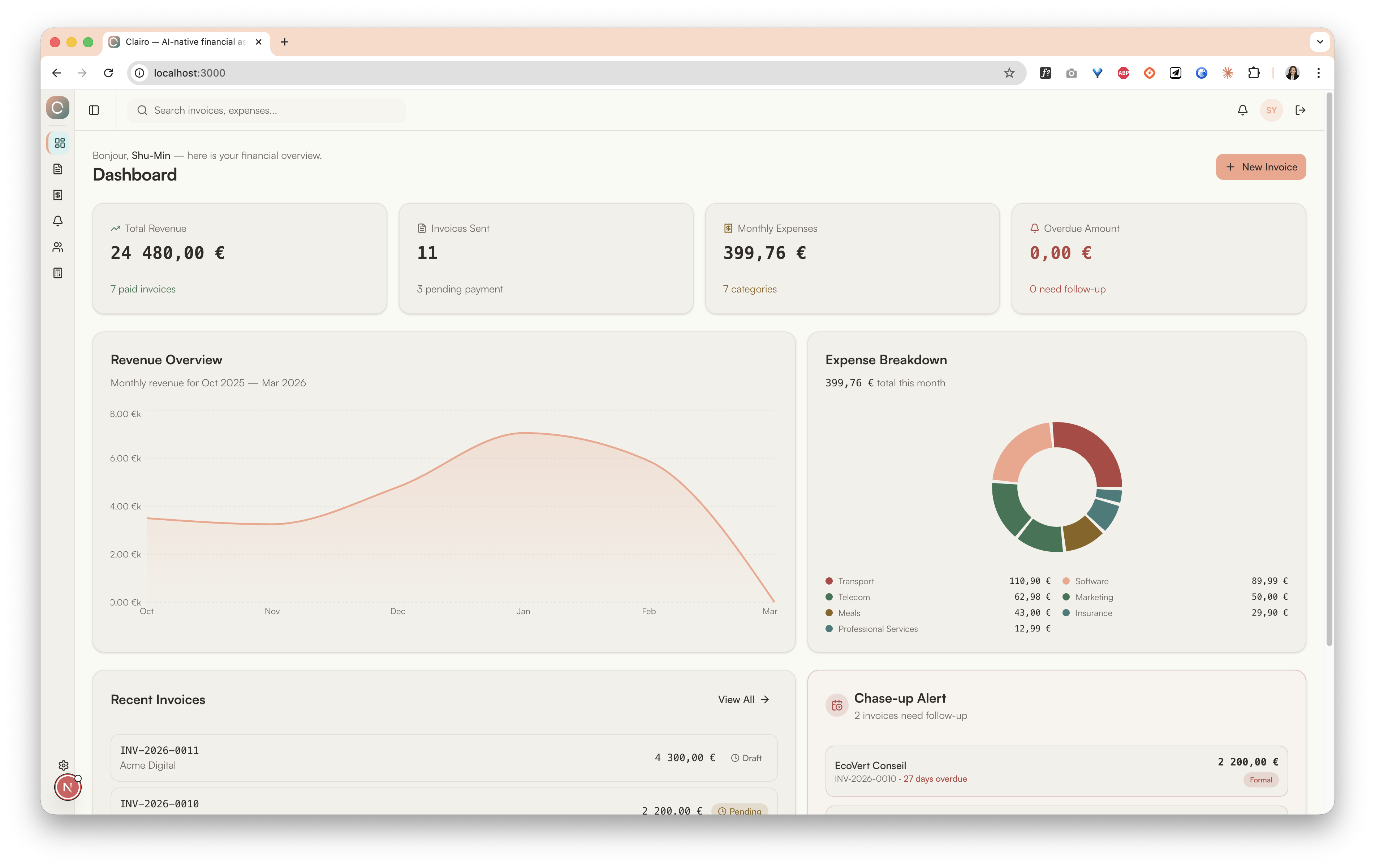
The dashboard gives freelancers an instant overview of their financial situation: revenue trends, expense breakdown, and overdue invoice alerts. Everything a freelancer needs to answer "How is my business doing?" in under 5 seconds.
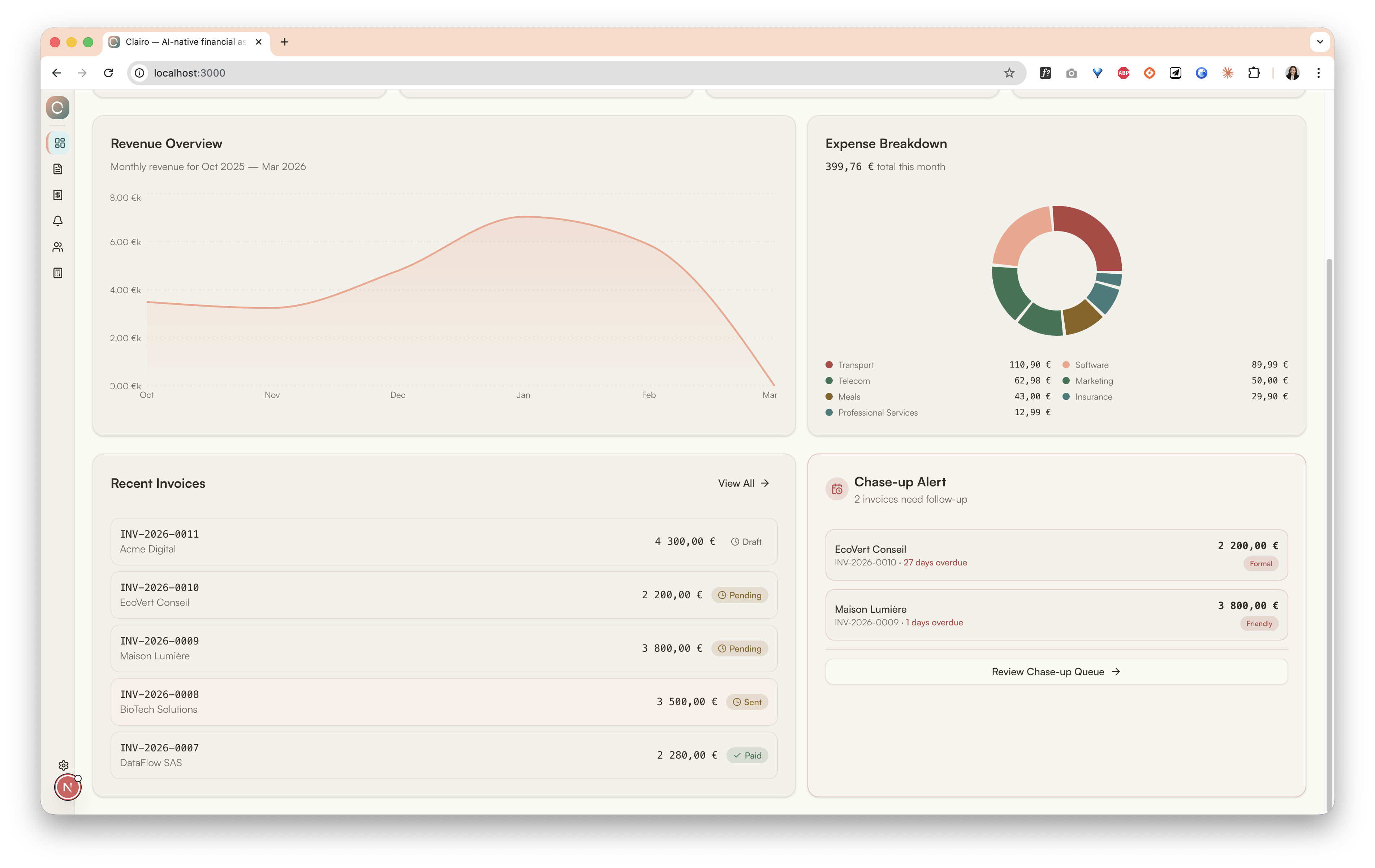
Design Decision: Chase-up Alert on the Dashboard
Key Features
4 KPI Cards
Total revenue, total expenses, outstanding invoices, and overdue count — updated in real time.
Revenue Chart
Recharts AreaChart showing monthly revenue trends with smooth gradients in the Clairo salmon palette.
Expense Pie Chart
Visual breakdown of spending by category (Software, Travel, Equipment, etc.) with interactive hover states.
Chase-up Alert
Prominent alert card when invoices are overdue, with a direct link to the AI chase-up workflow.
Clairo's invoicing module handles the complexity of French compliance (SIRET, TVA, mandatory mentions) so freelancers can focus on their work. Invoices follow a clear Draft → Sent → Paid → Overdue status flow.
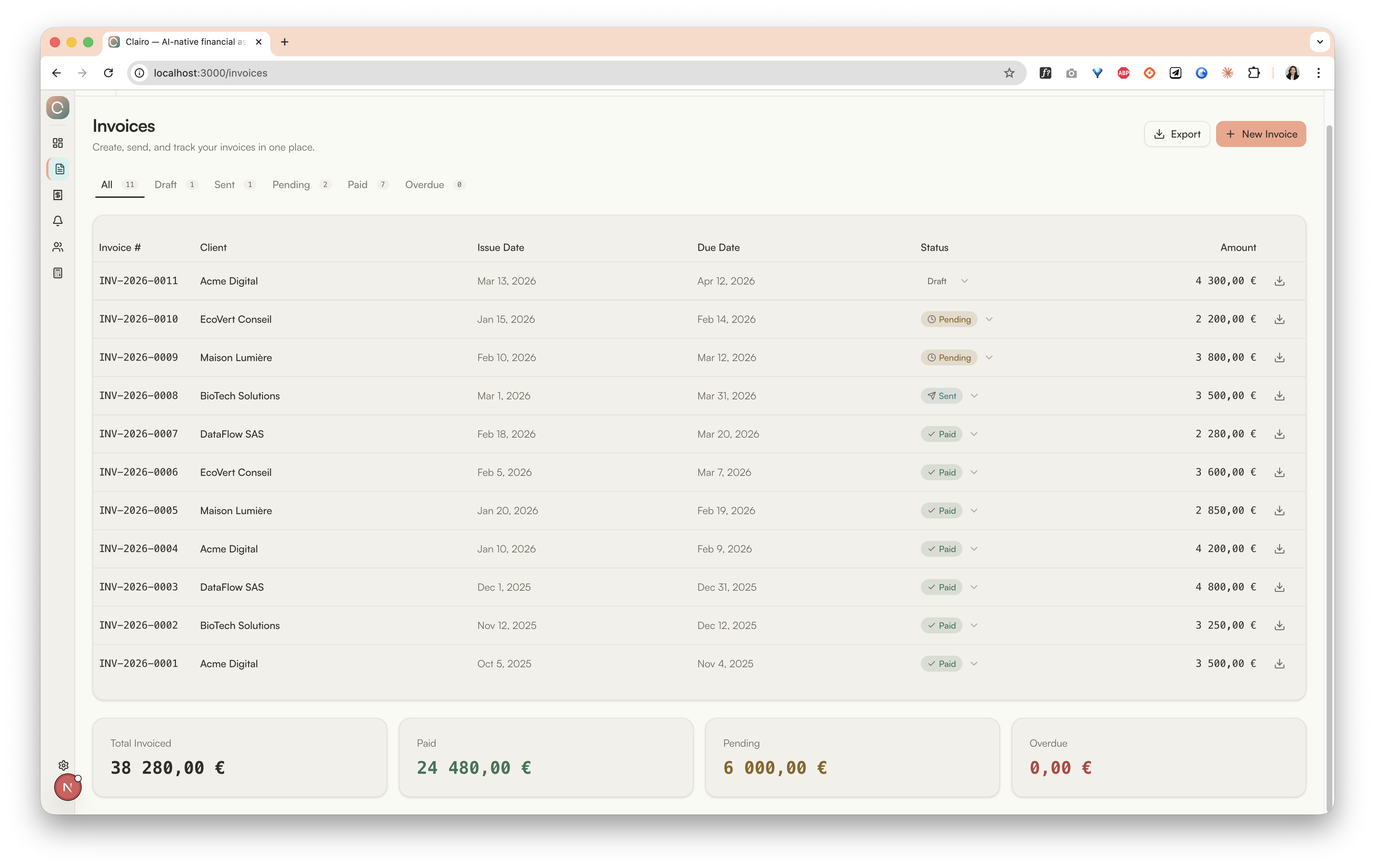
Design Decision: Why Status-Driven, Not Action-Driven?
Key Features
- Status flow: Draft → Sent → Paid / Overdue — clear visual badges for each state
- SIRET / TVA compliance: Auto-populated fields, mandatory mention validation, French legal requirements built in
- Dialog-based creation: Clean modal form for creating invoices without leaving the current view
- Summary bar: Total invoiced, total paid, total overdue at a glance across the top of the page
The star feature of Clairo. Instead of copy-pasting awkward email templates, freelancers select a tone and let AI generate a contextually appropriate payment reminder. The tone automatically escalates based on how many days the invoice has been overdue.
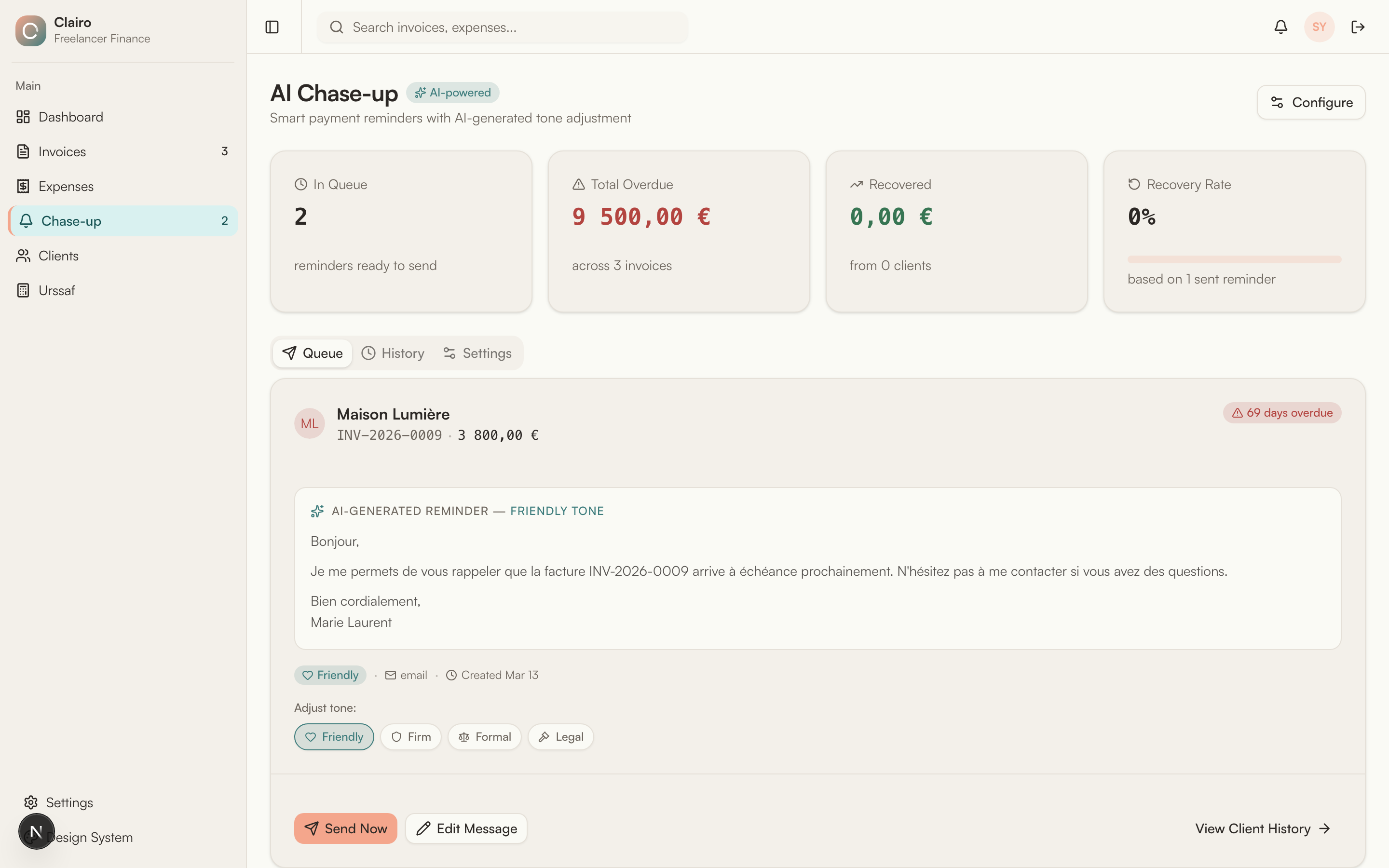
4 Tone Modes
Gentle nudge, warm language
Direct but polite request
Professional formality
Formal notice with legal terms
Escalation Timeline
Clairo suggests the appropriate tone based on how long the invoice has been overdue. The freelancer always has the final say — AI suggests, humans decide.
AI-Generated Email Preview
The freelancer reviews the AI-generated email before sending. One click to copy or send. Full control over the message — edit, adjust tone, or write from scratch.
Bonjour Marie,
J'espere que tout va bien de votre cote ! Je me permets de vous envoyer un petit rappel concernant la facture #2026-042 d'un montant de 1 850,00 €, dont l'echeance etait le 15 janvier.
Il est possible que le reglement soit deja en cours — si c'est le cas, n'en tenez pas compte. Sinon, pourriez-vous me confirmer une date de paiement ?
Je reste disponible si vous avez la moindre question.
Bien cordialement,
Sophie Martin
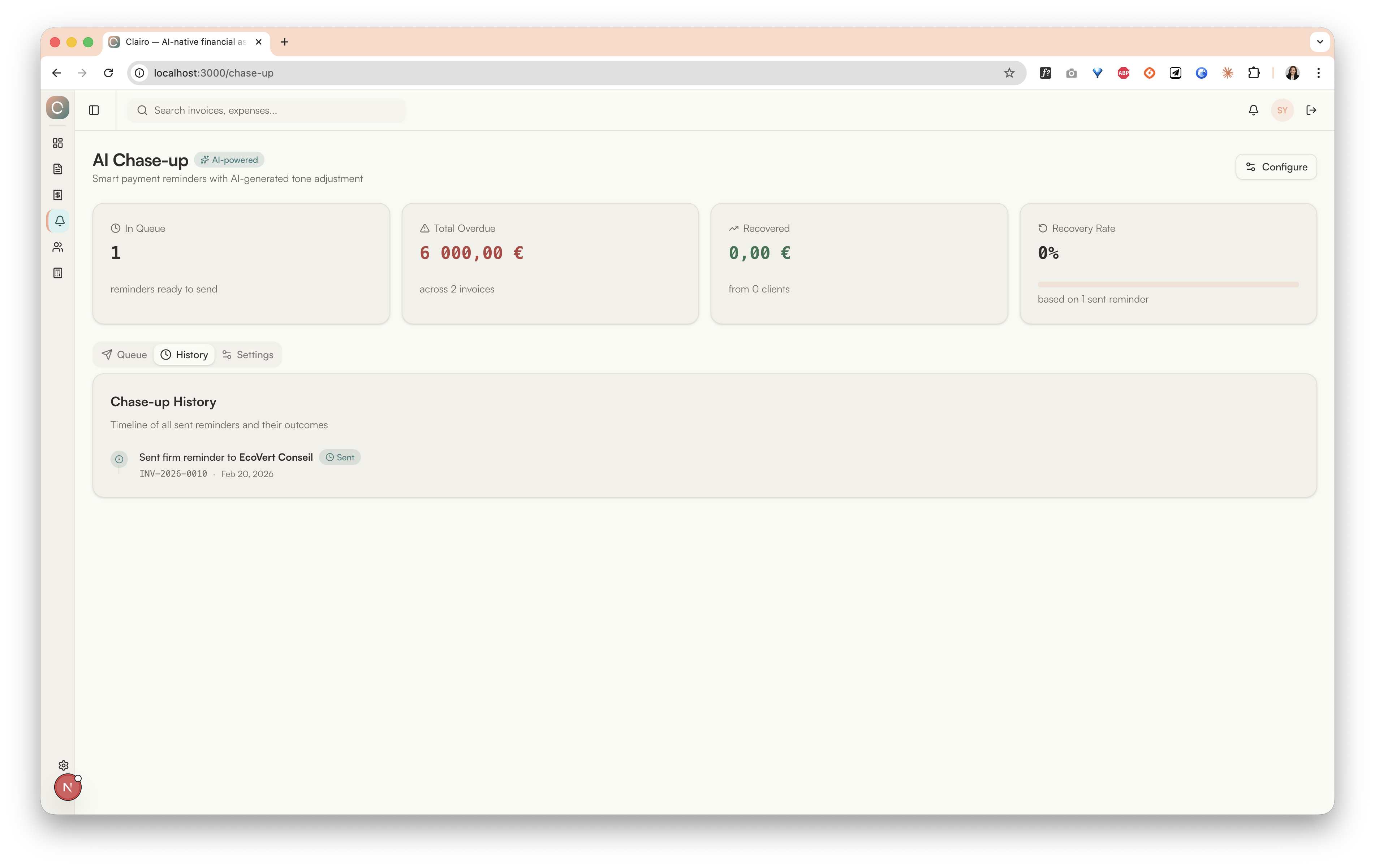
Chase-up History
Every sent reminder is logged with its tone, date, and outcome. This gives freelancers a clear audit trail — essential for escalation to formal or legal notices, where proof of prior contact attempts matters.
Design Principles
- AI suggests, human decides — The freelancer always reviews and approves the message before sending
- Escalation is transparent — The timeline shows exactly why a particular tone is recommended
- One-click action — Copy to clipboard or send directly, minimizing friction
- Editable output — AI-generated text is fully editable, never locked
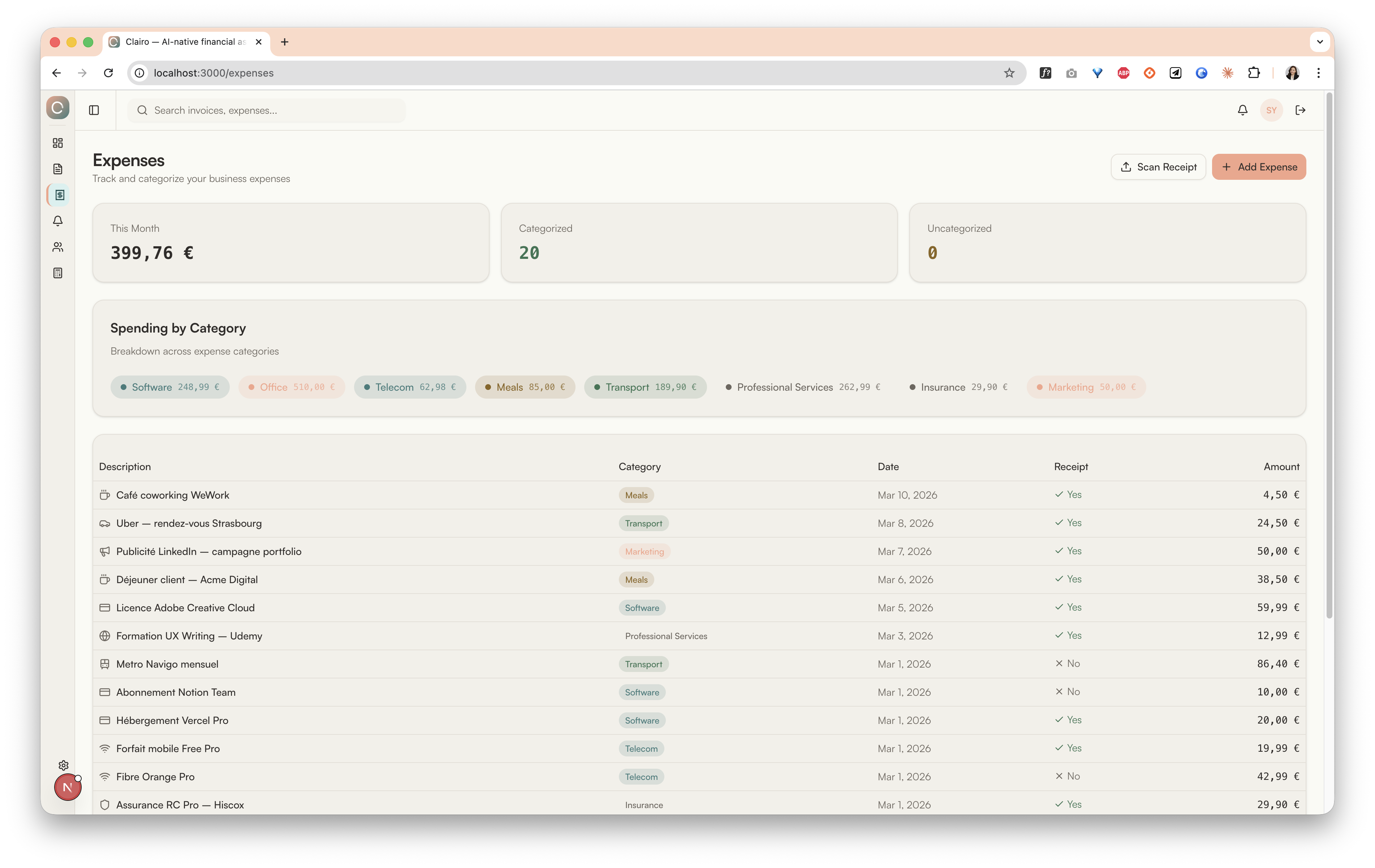
Most freelancers track expenses in spreadsheets or not at all. Clairo provides a structured, categorized expense tracker with receipt management, making tax season painless and giving freelancers real visibility into their spending.
Design Decision: AI Suggests Categories, Humans Confirm
Key Features
8 Category Badges
Software, Travel, Equipment, Office, Marketing, Professional Services, Subscriptions, Other — color-coded for quick scanning.
Receipt Tracking
Each expense shows receipt status (Yes/No). Future: OCR receipt scanning to auto-extract amounts and dates.
Spending by Category
Visual breakdown showing where money goes. Helps freelancers identify their biggest cost centers.
Add Expense Dialog
Quick-add modal with category picker, amount, date, description, and receipt upload. Minimal steps to log an expense.
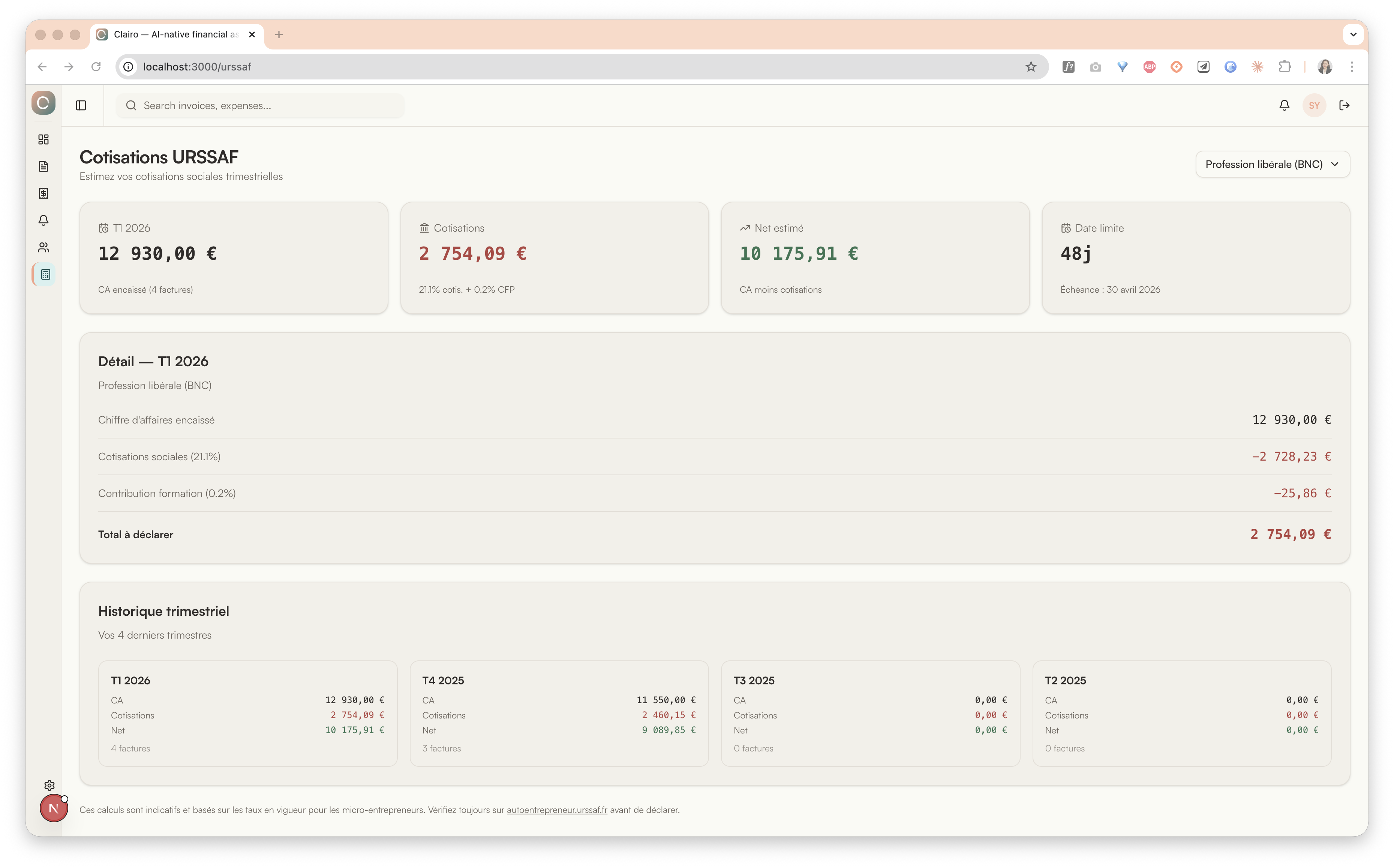
Every French micro-entrepreneur must declare and pay quarterly social contributions (cotisations URSSAF). The rates differ by profession type, and miscalculating means either cash surprises or overpayment. Most freelancers use spreadsheets or the URSSAF website to estimate — disconnected from their actual revenue data.
Design Decision: Why Build This In?
Key Features
Auto-Calculated from Revenue
Pulls paid invoice totals for the quarter. No manual data entry — the estimate is always based on real numbers.
Profession Type Selector
Profession libérale (BNC) vs. commercial (BIC) have different rates. One dropdown, correct calculation.
Quarterly History
Side-by-side view of the last 4 quarters: revenue, contributions, and net income. Helps spot trends and plan ahead.
Deadline Awareness
Shows the next declaration deadline with days remaining. No more missed URSSAF dates.
Payment follow-up is not just a financial transaction — it happens within a relationship. Clairo's client management provides the context that makes AI chase-up smarter: who is this client? How long have we worked together? What's their payment history?
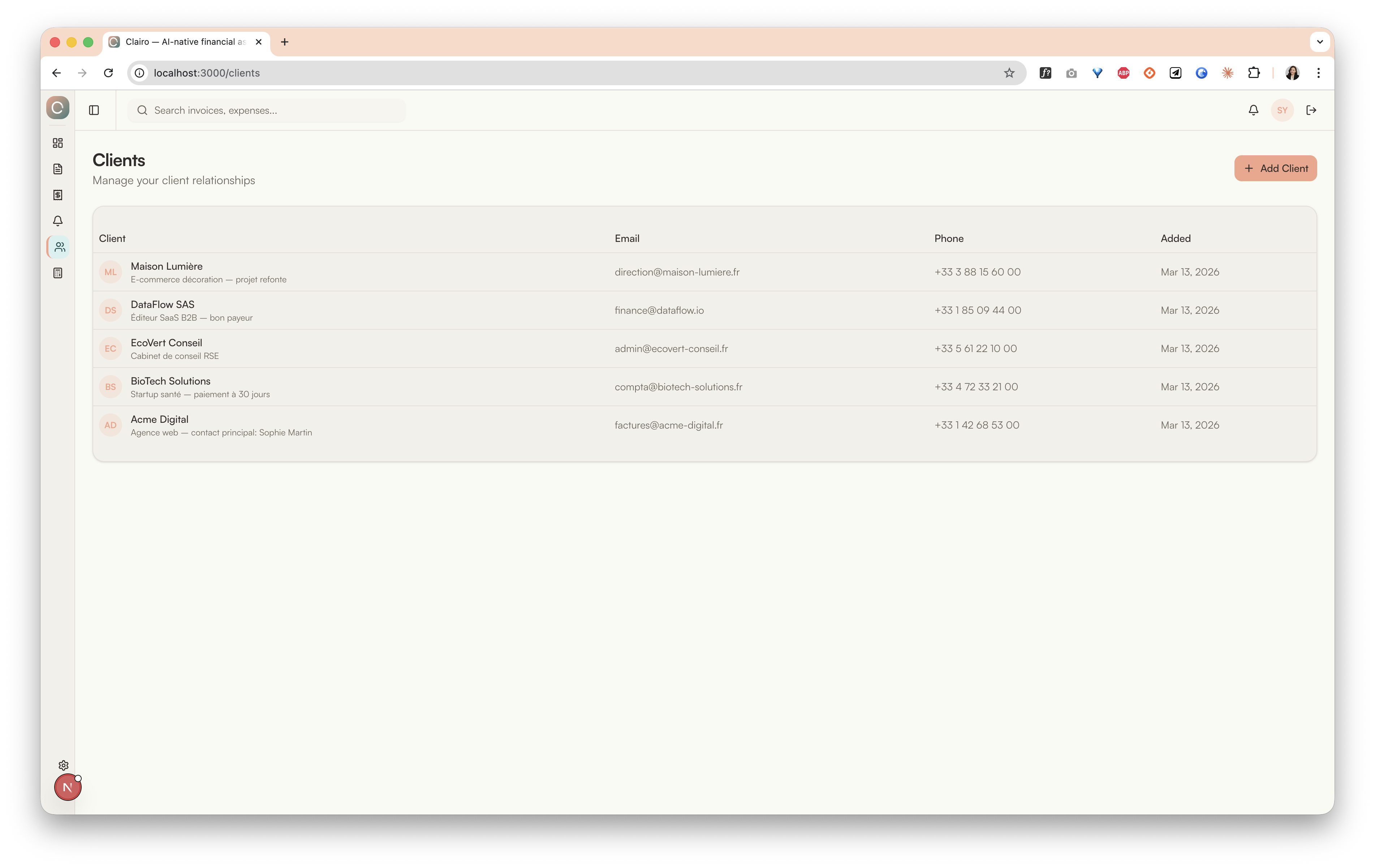
Design Decision: Notes as Relationship Memory
Financial tools need emotional design
Warm colors and humanist typography measurably reduce the anxiety freelancers feel about financial admin. Salmon and cream feel friendlier than blue and white. The visual tone of a financial tool is as important as its functionality — if it feels intimidating, people avoid it.
AI should suggest, not automate
Users need control over chase-up tone and timing. Auto-sending payment reminders would destroy client relationships. The right model is: AI drafts, human reviews, human sends. This is especially true for freelancers who have personal relationships with their clients.
The biggest opportunity is in-between
Linking invoices to expenses is the gap nobody fills. When you can see that Invoice #042 paid for the Figma subscription logged in expenses, financial management becomes coherent instead of fragmented. This connection is Clairo's long-term differentiator.
Identified Interaction Gaps
Through systematic gap analysis, I identified 10 interaction gaps for future iterations:
Business Viability
Free
3 invoices/month, basic expenses
9€/mo
Unlimited invoices, AI chase-up
19€/mo
Bank sync, OCR, full analytics
Building financial tools for freelancers taught me that the biggest barrier isn't technology — it's emotional friction. When tools feel warm and respectful, people actually use them.
Clairo is a working application with real data and AI features. Here are the next areas of development:
Enhanced AI Features
Expand AI capabilities beyond expense classification and chase-up email generation. Add smart invoice amount suggestions based on historical data, and predictive cash-flow forecasting.
Open Banking Integration
Connect with Bridge API for bank transaction syncing. Auto-match bank movements to expenses and invoices. PSD2-compliant, bank-agnostic.
OCR Receipt Scanning
Take a photo of a receipt, OCR extracts the amount, date, vendor, and category. Dramatically reduces manual data entry for expense tracking.
Invoice-Expense Auto-Linking
Automatically connect incoming payments to invoices, and outgoing payments to expenses. The "missing link" that makes financial management coherent.
Mobile-First Responsive Views
Freelancers manage finances on-the-go. A responsive mobile layout would let them check overdue invoices, log expenses, and review chase-up status from their phone.
Scope note: Clairo is a working application with Supabase backend, real authentication, and OpenAI-powered AI features (expense classification and chase-up email generation). Banking integrations and OCR are planned for future iterations.