Designing Transparency into Agentic AI
PR→PO Copilot is an AI-assisted procurement prototype where an LLM-powered copilot guides requisition creation, while deterministic tools and rules handle lookups, routing, and audit logging. The challenge: how do you make AI decisions visible, auditable, and trustworthy in enterprise workflows?
Design
Exploration
4
AI Agents Mapped
4
Transparency Patterns
Full
Working Prototype
This is a spending management copilot that transforms how enterprises handle procurement requests. The system combines LLM-powered natural language understanding with deterministic business rules — the AI interprets what users want to buy, while rule-based agents handle catalog lookups, supplier validation, approval routing, and audit logging. This separation ensures every decision is traceable and compliant.
Three user roles, one unified experience
Describe what they need in plain language — "I need a laptop for the new hire starting Monday" — and the copilot handles catalog matching, supplier selection, and form completion automatically.
See AI-generated summaries with risk signals, budget impact, and policy compliance status at a glance. Approve, reject, or request more information without switching between ERP screens.
Convert approved PRs into POs with copilot suggestions for consolidation, alternate suppliers, and contract optimization. Override AI recommendations with mandatory reason capture for continuous learning.
What I designed:
- Agent orchestration architecture (LLM boundaries, tool separation)
- Transparency pattern system (Source Chips, Agent Actions, Rule IDs)
- Information architecture and conversation flow design
- Trust measurement framework and KPIs
AI-assisted execution: The working prototype was built with Claude Code, allowing rapid iteration. I directed the design decisions; AI accelerated the implementation.
This design exploration followed a diverge-converge pattern, balancing rapid prototyping with structured validation.
Week 1-2
Research & Framing- Competitive analysis of AI procurement tools
- Enterprise AI trust pattern research
- Defined core design questions
Week 3-4
Architecture Design- Agent orchestration model
- Service blueprint mapping
- LLM boundary definition
Week 5-8
Prototyping & Iteration- AI-assisted UI development
- Transparency pattern exploration
- 3 major design iterations
Ongoing
Documentation- Pattern library creation
- Case study writing
- Measurement framework
Collaboration
While this is a solo design exploration, I simulated a cross-functional process: I wore multiple hats as product thinker (defining scope and priorities), domain researcher (procurement workflow analysis), and technical architect (API constraints and AI capabilities). In a production setting, this work would involve collaboration with procurement SMEs for domain validation, engineering leads for feasibility review, and compliance teams for audit requirements.
Key design decisions & trade-offs
Why separate LLM from deterministic tools?
Considered: End-to-end LLM with function calling for everything.
Chose: LLM for interpretation only; rule-based agents for decisions.
Rationale: Enterprise auditors need reproducible decision paths. "The AI decided" isn't acceptable for procurement compliance.
Why collapsed-by-default for Agent Actions?
Considered: Always-visible action log (like terminal output).
Chose: Progressive disclosure — collapsed by default, expandable on demand.
Rationale: 80% of users trust the summary; 20% want to verify. Don't punish the majority with information overload.
Why Source Chips instead of footnotes?
Considered: Traditional citations at bottom of messages.
Chose: Inline colored chips next to each data point.
Rationale: In high-frequency workflows, glanceability beats thoroughness. Users scan, not read.
Each decision was documented with alternatives considered — making it easier to revisit choices as requirements evolve.
Before designing the UI, I mapped out how different agents coordinate in this workflow. The principle: "Make the agent's reasoning available on demand."
Interpret intent · Generate summary · Ask clarifying questions
Catalog lookup · Totals calculation · Vendor validation · Policy checks
Routing decisions · Rule IDs · Thresholds
Confidence flags · Missing info · Anomaly detection
Agent responsibilities
Copilot (LLM)
Interprets user intent, generates human-readable summaries, and asks clarifying questions when input is ambiguous. Never makes decisions.
Tool Agents
Deterministic functions: catalog lookup, price totals, vendor validation. Each call logged with inputs/outputs for audit.
Rules Engine
Evaluates business policies and returns routing decisions with explicit rule IDs (e.g., AMOUNT-001). No ML uncertainty.
Risk Signal Agent
Flags low-confidence matches, missing required fields, and unusual patterns. Triggers human review when thresholds exceeded.
This layered architecture ensures the LLM handles interpretation while deterministic systems handle decisions—making the workflow auditable and enterprise-safe.
System flowchart: Happy Path vs. Conflict Path
This diagram maps the complete workflow, showing how the system handles both successful requests and edge cases requiring human intervention.
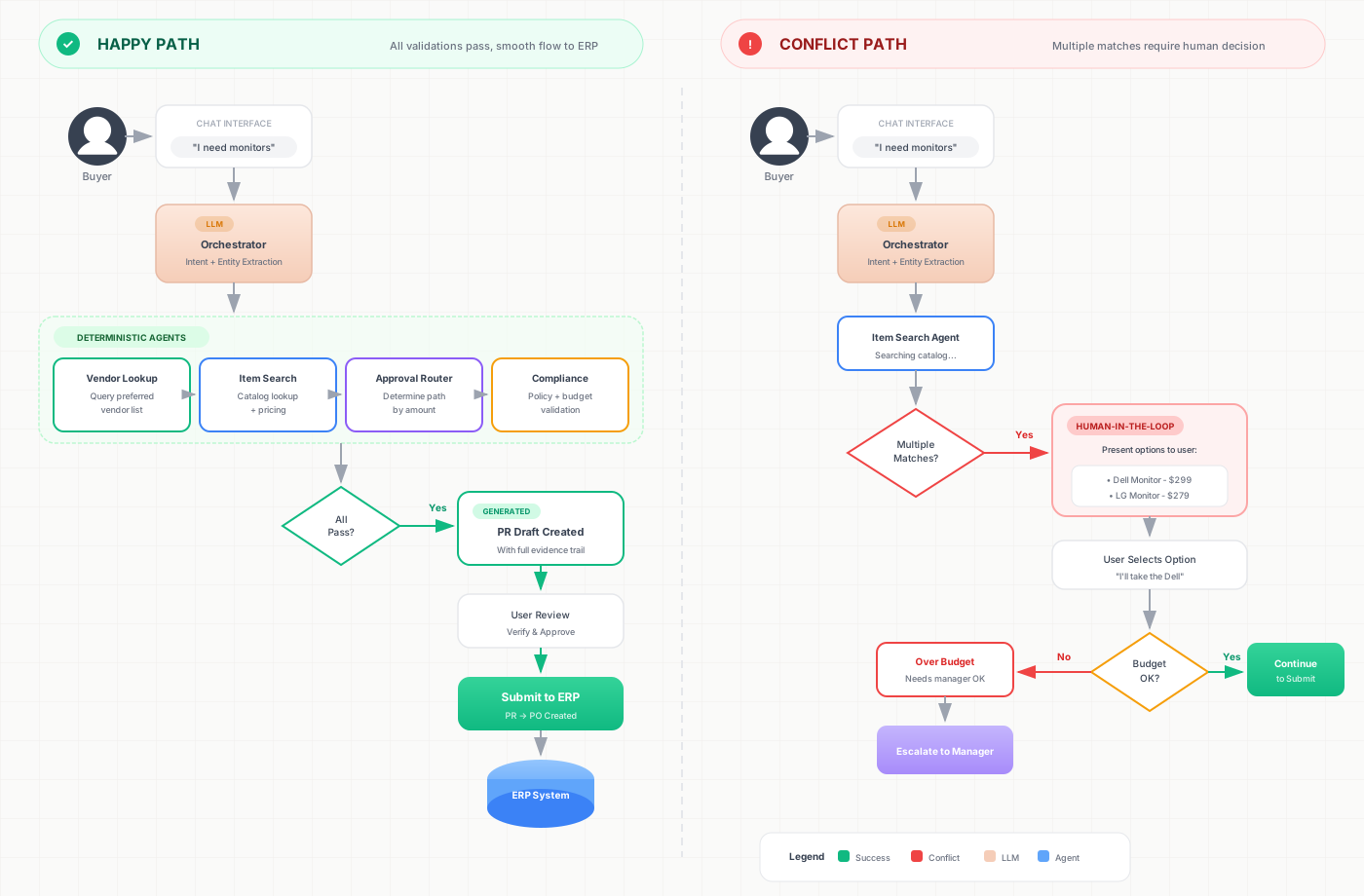
Before prototyping, I mapped the end-to-end journey showing frontstage interactions (user touchpoints), backstage processes (agent actions), and support systems (rules engine, audit log).
This blueprint informed the 4-layer agent model and identified where AI transparency patterns (Agent Actions, Source Chips) should appear in the flow.
In most AI chat interfaces, the assistant's response looks like "LLM talking"—users can't tell:
- What the AI actually did (Did it look up the catalog? Check inventory?)
- Where the data came from (Is this from our approved vendor list?)
- Why decisions were made (Why does this need Finance approval?)
"The AI just says 'I found 2 items'—but I can't verify if it checked our preferred vendors."
— Common user concern (pattern)
"If this goes to audit, how do I prove the AI followed our procurement policies?"
— Common governance concern (pattern)
This is the "black box" problem of agentic AI: powerful capabilities hidden behind opaque responses.
Who feels the pain?
Requesters (Employees)
Fear of procurement forms — unsure which supplier to select, which cost center applies, or what "commodity code" means. They end up emailing procurement for help, creating bottlenecks and delays for simple requests.
Approvers (Managers)
Overwhelmed by dense forms with 20+ fields. Can't quickly identify if a request exceeds budget, violates policy, or uses a non-preferred vendor. Often approve without full understanding due to time pressure.
Buyers (Procurement)
Time wasted on preventable issues: rejected POs due to incomplete data, returns from wrong supplier selection, chasing requesters for missing information. Strategic sourcing takes a back seat to firefighting.
The AI Copilot fundamentally changes how procurement requests flow through the organization. Here's the comparison:
Before: Traditional Flow
After: AI-Assisted Flow
The transformation isn't just about speed—it's about shifting cognitive load from users to the system while maintaining human control over decisions.
Beyond single-turn interactions, I mapped out multi-turn flows and designed explicit fallback and escalation patterns for high-risk scenarios.
Simplified dialogue flow
High-risk scenarios & escalation patterns
For each scenario, I designed specific fallback and recovery flows:
Missing required data
Example: User doesn't specify cost center
Low confidence match
Example: Ambiguous supplier or SKU selection
Policy conflict / Exception needed
Example: Request exceeds budget or requires special vendor
Each pattern maps UI components I've already designed—validation checklist for missing data, source chips for low confidence, routing banner for policy conflicts—into a coherent conversational system.
The core design tension in agentic AI interfaces:
- Too little visibility → users don't trust the AI, hesitate to adopt, and escalate to humans unnecessarily
- Too much information → cognitive overload, slower workflows, and users start ignoring the transparency features entirely
After exploring several approaches (always-visible agent logs, expandable side panels, inline annotations), I framed my design goal as:
This led to a principle: progressive disclosure of agent actions. The key insight is that trust comes from knowing you can verify, not from being forced to verify every time. Show evidence when users need it (verification, audit, debugging), hide complexity when they don't (routine tasks, trusted flows).
Under each assistant message, I added a collapsible "Agent Actions" panel that shows:
- Tool name — what the agent did (e.g., "Lookup Catalog Items")
- Result summary — outcome (e.g., "Matched 2 items from Engineering standard kit")
- Evidence refs — data IDs for audit trail (e.g., SKU:LAPTOP-001)
Design decisions
- Collapsed by default — doesn't interrupt the conversation flow
- Count badge — "Agent Actions (3)" signals there's content without revealing it
- Status icons — green checkmarks for success, red X for errors
This panel surfaces deterministic tool execution logs (function calls + outputs) rather than free-form LLM explanations.
For line items, I designed source chips — color-coded badges that show where each piece of data came from. This addresses a common concern: "The AI says this supplier is good, but how do I know it actually checked our approved vendor list?"
- Catalog — item found in the company's approved catalog (with SKU reference)
- Standard kit — matches department standard equipment list (e.g., "Engineering standard laptop")
- Preferred — vendor is on the preferred/contracted supplier list (with contract ID)
- In stock — available in company warehouse (with location and quantity)
Why this matters
Instead of text like "Matches Engineering standard kit" (which could be LLM hallucination), chips provide:
- Scannable at a glance — color-coded chips are faster to scan than reading full sentences, allowing users to quickly assess compliance status for multiple line items
- Audit-ready evidence — hovering reveals reference IDs (SKU, contract number, vendor ID) that can be traced back to source systems for audit verification
- Honest attribution — users know exactly where each piece of data originated, building justified trust rather than blind faith in AI outputs
After submission, a routing banner appears at the top of the PR, showing the complete approval path and explaining why each approver is required. This addresses a common frustration: "Why does this simple request need Finance approval?"
Rule-based transparency
Each routing reason includes a rule ID (e.g., AMOUNT-001, VENDOR-001) that maps directly to documented business policies. This design choice has several important implications:
- Users understand "why" — instead of opaque routing, users see exactly which policy triggered each approval requirement (e.g., "AMOUNT-001: Orders over $5,000 require Finance approval")
- Auditability by design — every routing decision can be traced back to a specific rule, making compliance verification straightforward for auditors
- No "AI magic" — the system is fundamentally a rules-driven workflow surfaced through a conversational UI. The LLM helps users navigate the workflow, but deterministic rules make the actual decisions
Traditional form validation shows "40% complete" — but users don't know what's actually missing or what information they need to gather. This creates a frustrating guessing game that slows down submissions.
I designed a validation checklist that explicitly lists all required fields with their current status. The copilot can also help fill in missing information through conversation:
- At least one line item
- ○ Cost center — "Ask your department admin or check your previous PRs"
- ○ Need-by date — "When do you actually need this?"
- ○ Delivery location — "Office address or building code"
- ○ Business reason — "Brief justification for the purchase"
This transforms "Submit disabled" from a frustrating dead-end into actionable guidance. Users know exactly what they need to provide, and the copilot can help them find or fill in the information through natural conversation.
Beyond the chat interface, I designed four additional screens to cover the complete PR→PO lifecycle. Each screen is tailored to a specific user role and task, ensuring the right information is surfaced at the right moment.
Chat + Draft Entry (Requester)
Split-panel layout: left side for natural language conversation with the copilot, right side shows the real-time PR draft with validation checklist, policy compliance hints, and remaining budget. Users can chat or directly edit fields — both paths sync automatically.
Manager Approval Card (Approver)
AI-generated summary card with risk tags (budget impact, policy flags, unusual patterns), key facts at a glance (requester, total amount, need-by date), and clear CTAs: Approve / Reject / Request Info. Designed for mobile-first approval workflows.
Buyer PO Workbench (Procurement)
Batch processing view for procurement professionals. Select multiple approved PRs, receive copilot suggestions for order consolidation, alternate suppliers with better pricing, or contract-compliant substitutions. Override AI recommendations with mandatory reason capture.
Audit Timeline (Compliance)
Complete audit trail: every action logged with timestamps, user IDs, and AI involvement markers. Shows who did what, when, and what AI assistance was used. Searchable by rule ID, user, date range, or action type. Exportable for compliance reporting.
Workflow Admin (Backoffice)
Canvas-based workflow builder for configuring agent orchestration. Administrators can drag-and-drop agent nodes, connect them with conditional logic, set confidence thresholds for human escalation, and configure business rules without code changes. View interactive prototype →
When building AI prototypes, it's tempting to hardcode impressive results. I set constraints for myself:
Hardcode rules, not results
The routing logic checks actual business rules (amount thresholds, supplier status), not a pre-determined path. This makes the prototype honest about what's deterministic vs. what would need real AI.
Mark assumptions clearly
Where I used simulated data, I added "Prototype rule" badges. This prevents stakeholders from overestimating what the demo can do.
Show evidence, not claims
Agent Actions shows actual function execution, not LLM-generated descriptions. The difference matters for trust and audit.
UX decisions for enterprise adoption
Reduce "form fear"
Use conversational guidance instead of overwhelming forms. Instead of presenting 20+ fields at once, the copilot asks targeted questions and auto-fills where possible. Users see only decision-relevant information at each step, with the full form available for power users.
Decisions happen in-context
Approvers see budget impact, risk signals, and policy flags on the same card — no switching between ERP screens to gather context. AI-generated summaries highlight what matters, with full details expandable on demand.
Clear AI boundaries
The LLM interprets user intent and generates human-readable summaries; deterministic rules engines make decisions with explicit rule IDs. This separation makes the system auditable, reproducible, and reduces the risk of LLM hallucination affecting critical business outcomes.
To enable clients and internal teams to adopt these patterns, I documented decision criteria and templates that can be used in discovery workshops, pitch decks, and implementation guides.
When to use LLM vs deterministic
- LLM: Intent parsing, summarization, natural language generation
- Deterministic: ID lookups, calculations, policy enforcement
Confidence thresholds
- >90%: Auto-proceed with evidence
- 70–90%: Show options, require selection
- <70%: Force user confirmation
Standard escalation triggers
- Policy rule conflict detected
- Multiple low-confidence matches
- User explicitly requests exception
- Amount exceeds auto-approval threshold
Transparency UI patterns
- Agent Actions Panel (collapsible)
- Source Chips (color-coded provenance)
- Rule IDs in routing banners
- Validation checklists (not %)
Sample prompt patterns
"I found {count} matching items. To proceed, I need:
• {missing_field_1}
• {missing_field_2}
You can select from the options below or type your answer."
// Policy conflict template
"This request triggers rule {rule_id}: {rule_description}.
You can:
1. Modify the request to comply
2. Request an exception (requires additional approval)"
Responsible AI checklist
Note: These are hypothetical projections based on industry benchmarks, not measured data from a production deployment. The purpose is to illustrate the types of outcomes this design aims to enable.
5→2
days
PR→PO cycle time
30%→10%
reduction
rejection rate
~20%
reduction
maverick spending
How these estimates are derived
- Cycle time reduction: Conversational UI + auto-filled fields reduces form friction; AI-surfaced risk signals enable faster approvals.
- Rejection rate: Validation checklist catches missing fields before submission; source chips ensure correct supplier/SKU selection.
- Maverick spending: Industry data suggests tail spend can represent up to 20% of procurement costs. Policy enforcement at creation time reduces off-contract purchases.
AI systems fail. The design question isn't if but how gracefully. I mapped out failure scenarios and designed explicit fallback patterns for each:
Price or inventory data outdated (>30 days)
Timestamp check on vendor data
"Price may have changed" warning chip
Require re-quote before PO generation
Multiple rules match with conflicting outcomes
Rules engine returns >1 blocking rule
Show both policies with rule IDs
Escalate to compliance officer for resolution
No approved vendor found for item category
Empty results from vendor lookup tool
"No preferred vendors" message + suggestions
Offer "Expand search" or manual vendor entry
LLM uncertainty exceeds threshold
Intent classification confidence <70%
Don't auto-fill; show "I'm not sure" prompt
Ask clarifying question or offer options
The principle: when the system doesn't know, it should say so — and provide a clear path forward rather than guessing.
In agentic workflows, humans need control without friction. I designed specific mechanisms to balance AI efficiency with human oversight:
Override mechanism design
Buyer Override
Change AI-suggested vendor with mandatory reason selection: Better price, Existing relationship, Faster delivery, Other
Evidence Capture
Override reason + original suggestion stored in audit log. Enables pattern detection across users.
Learning Signal
High override rate for a vendor → flag for catalog review. Human corrections inform system improvement.
When humans must intervene
The goal: humans can override at any point, but must override only when the system explicitly requires it and only in high-risk scenarios.
To validate that transparency patterns actually build trust, I defined a measurement framework with leading indicators (behavior) and lagging outcomes (business impact).
North Star Metric
Target
90%+
PO Approval Rate without Buyer Override
Trust metrics
| Metric | Baseline | Target | Why it matters |
|---|---|---|---|
| Evidence Coverage | ~60% | 95%+ | Every line item has source attribution |
| Override Rate | ~30% | <10% | Low override = AI suggestions are trusted |
| Source Chip Click Rate | n/a | 40%+ | Users verify sources = transparency works |
| Time to Approve | 15 min | <5 min | Trust + clarity = faster decisions |
| PO Return Rate | ~20% | <5% | Validation catches errors before submission |
Event tracking plan
To measure these, I defined specific events to instrument:
Success threshold: If evidence coverage reaches 95%+ and override rate drops below 10%, we can conclude that transparency patterns are building justified trust — not blind trust.
To continuously improve conversational AI experiences, I defined metrics that track both task success and user trust signals.
KPIs for prototype evaluation
| Metric | What it measures | Signal |
|---|---|---|
| Task success rate | PR submitted → PO generated | Higher = better |
| Correction loop rate | Clarifying exchanges per session | Monitor trend |
| Escalation rate | Human handoffs + reason breakdown | Investigate high |
| Policy conflict rate | Top 5 rules triggered | Inform policy review |
| Time-to-complete | Intent → Submit duration | Lower = better |
| User trust signals | Actions panel expand rate, source chip hover rate | Qualitative insight |
Learning from conversation logs
Structured logs enable continuous improvement:
- Top intents: What do users ask for most? Are prompts optimized for these?
- Failure points: Where do sessions drop off? Which fields cause most clarifying questions?
- Prompt iteration: A/B test response templates based on correction loop data
- Policy friction: Which rules trigger exceptions most often? Flag for policy review
Even in a prototype, designing for measurability creates a foundation for production iteration.
Key insights
Progressive disclosure is key for AI transparency
Users don't need to see every tool call—but they need to know they can see it. The collapsed-by-default pattern respects attention while enabling verification.
Color coding beats text for scanability
Source chips communicate data provenance faster than sentences. In high-frequency workflows, visual differentiation reduces cognitive load.
Rule IDs make AI auditable
Connecting every AI decision to a numbered business rule transforms "the AI decided" into "rule AMOUNT-001 triggered." This is the difference between magic and accountability.
Challenges encountered
Balancing transparency with overwhelm
Early iterations showed too much — every API call, every rule check. Users felt bombarded. The breakthrough was realizing transparency is about access to information, not forcing information. Progressive disclosure solved this.
Defining the LLM boundary
Initial designs let the LLM do more — including supplier selection. But every "AI decision" created an audit problem. The hardest part was convincing myself to restrict the AI's role, even though it could technically do more.
Designing without real users
As a design exploration, I couldn't validate with actual procurement teams. I compensated by studying published enterprise AI research and designing explicit measurement frameworks for future validation.
If I did this again
- Start with user research: Even informal interviews with procurement professionals would have grounded assumptions earlier.
- Build a simpler first version: I over-invested in the prototype UI before validating core patterns. A lower-fidelity test would have been more efficient.
- Document failures earlier: Some of the most valuable learnings came from abandoned approaches, but I only documented them late in the process.
Accessibility & responsive considerations
Accessibility
- Color coding supplemented with icons/labels (not color-only)
- Progressive disclosure respects screen reader flow
- High contrast ratios for Source Chips and status indicators
- Keyboard-navigable expandable sections
Responsive Design
- Chat interface scales for tablet/desktop
- Collapsible panels for smaller viewports
- Touch-friendly action buttons and chips
- Mobile-first approach for future iteration
This project taught me that designing AI interfaces isn't about showing what the AI can do — it's about showing what the AI did, and giving users the confidence to act on it.