
Time Entry: From Manual Input to AI-Powered Tracking
I designed a multi-role time tracking system for Sage X3 ERP that evolved from desktop workflows to mobile-first, and eventually integrated AI-powered time capture — increasing billable hours by 16%.
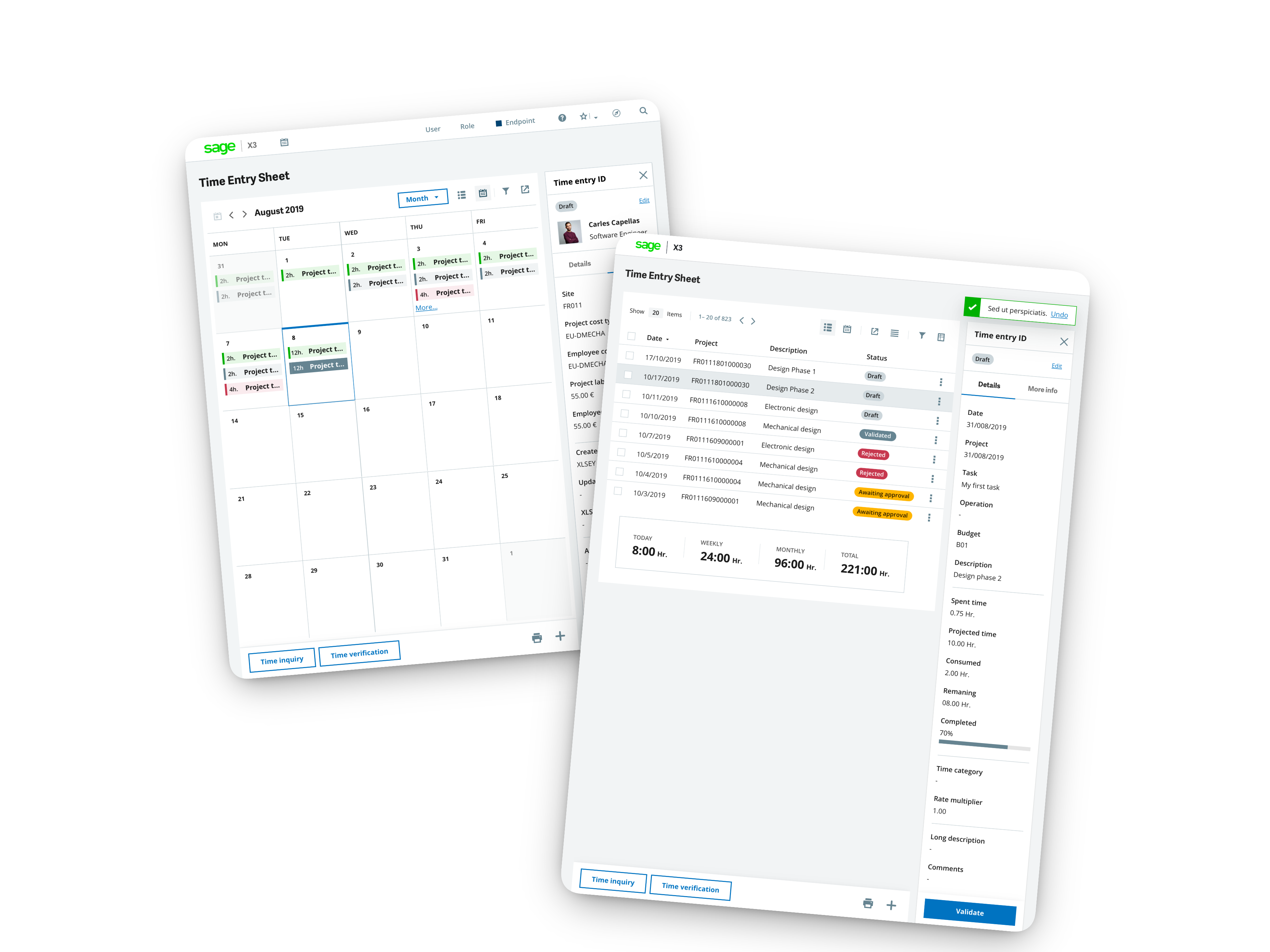
Product Evolution
To comply with my non-disclosure agreement, I have omitted and obfuscated confidential information in this case study. All information in this case study is my own and does not necessarily reflect the views of Sage.
Time Entry is the upstream data source for payroll calculation. Every hour logged flows into compensation, project costing, and compliance reporting. If time tracking is friction-heavy, payroll accuracy suffers.
This feature was built on ETNA — Sage X3's next-generation web interface — using the company's Design Language System (DLS) and Carbon component library.
The core complexity: designing a unified experience for three distinct user roles with different permissions, views, and actions — all within a single coherent system.
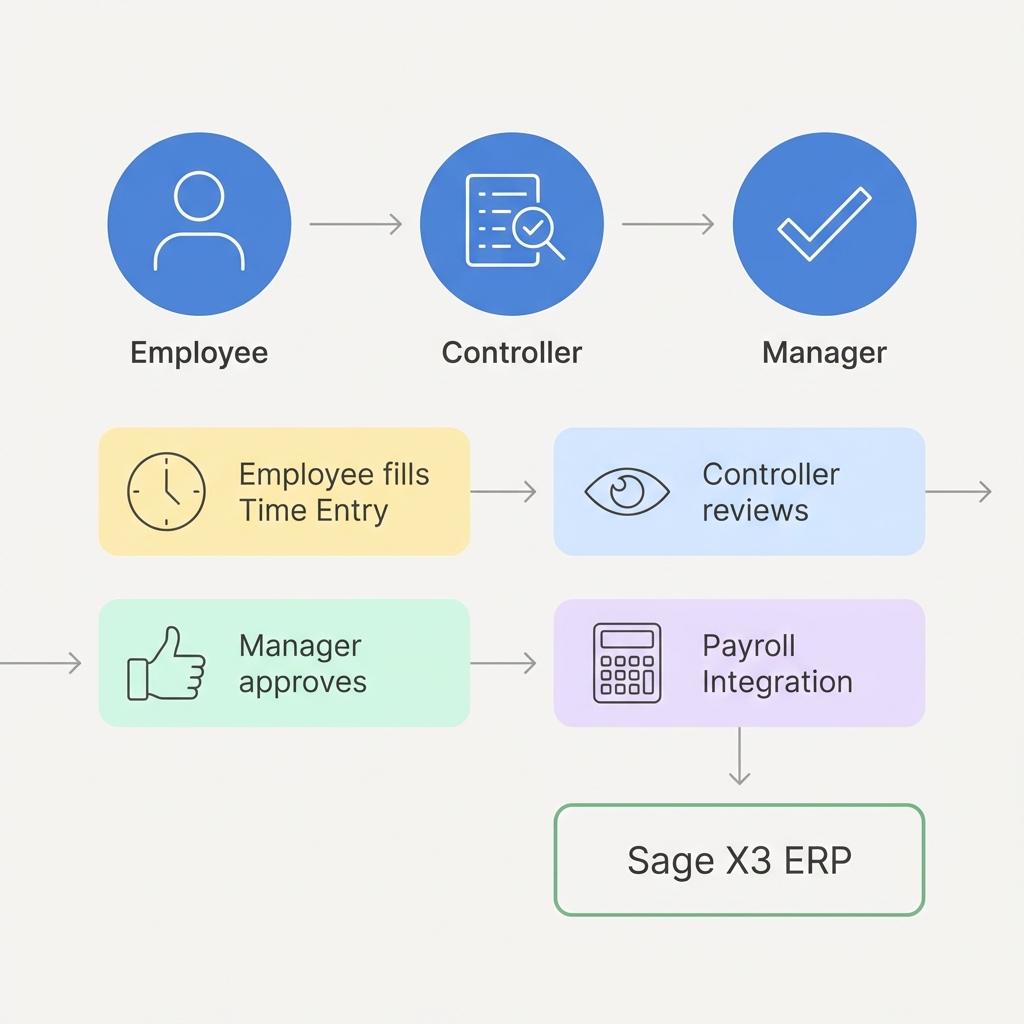
User Roles

Louise
Creates and validates time entries for herself. Can edit drafts, but once validated, needs manager approval to make changes.

Bryan
Reviews validated entries before manager approval. Can mark entries as "Controlled" or reject them back to employees.

Liz
Final approver. Can create entries on behalf of employees, approve/reject submissions, and navigate by employee, project, or task.
Status Flow
Each time entry moves through a lifecycle of states. The challenge was making this complex state machine intuitive for all users:
Before designing, I conducted a competitive analysis to understand how other time tracking solutions approached similar challenges. I categorized competitors into two groups:
| True Players Toggl, Harvest, Clockify | Enterprise SAP, Workday, Oracle | Our Opportunity Sage X3 Time Entry | |
|---|---|---|---|
| User Experience | ✅ Excellent | ❌ Complex | ✅ Consumer-grade |
| ERP Integration | ❌ Limited | ✅ Deep | ✅ Native X3 |
| Multi-role Workflow | ⚠️ Basic | ✅ Full | ✅ 3 roles, 5 states |
| Payroll Connection | ❌ None | ✅ Built-in | ✅ Direct to payroll |
| Responsive Design | ✅ Mobile-first | ⚠️ Desktop-focused | ✅ 5 breakpoints |
Key insight: True Players offered superior UX but lacked enterprise depth, while Enterprise solutions had integration but poor usability. Our opportunity was to combine the best of both: enterprise integration with consumer-grade UX.
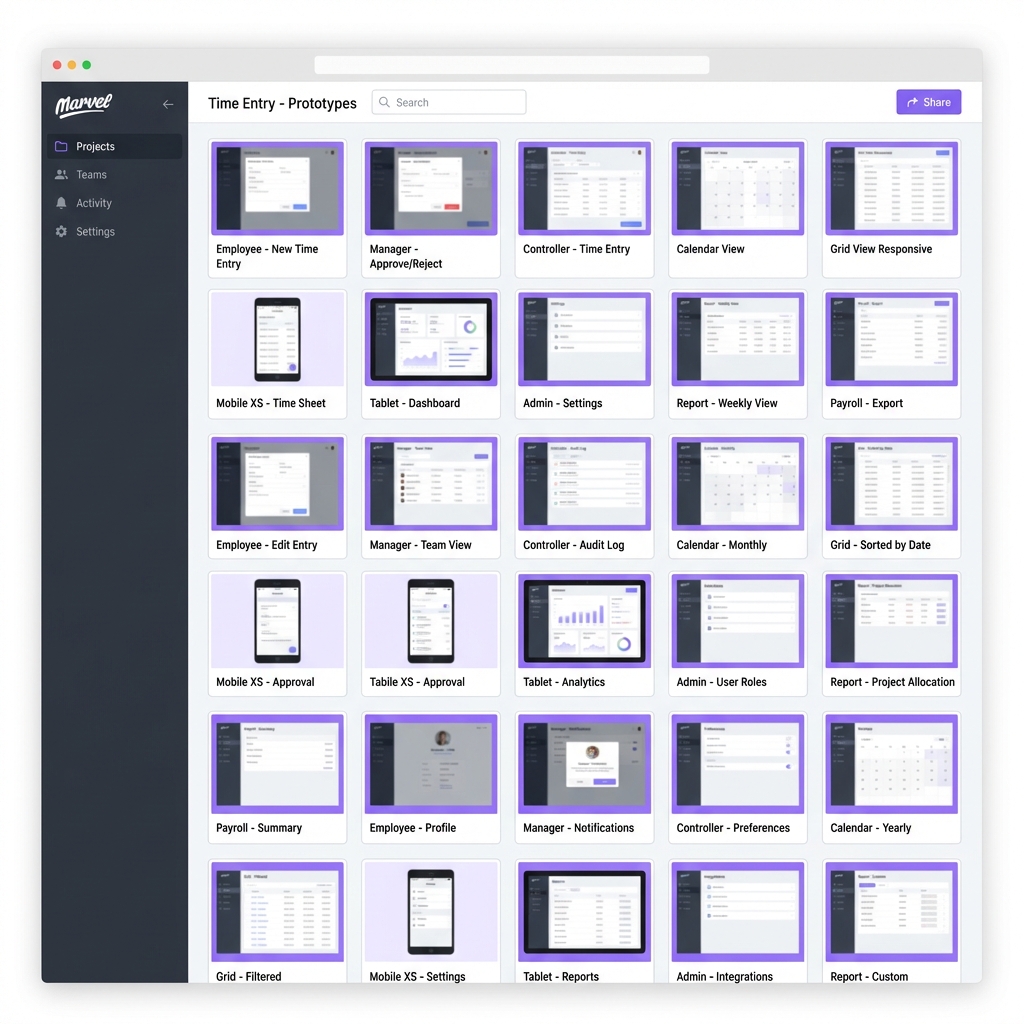
Before diving into high-fidelity design, I created wireframe prototypes to validate user flows with stakeholders. This ensured alignment on:
- Which actions each role could perform
- How status transitions would be visualized
- Navigation patterns between views
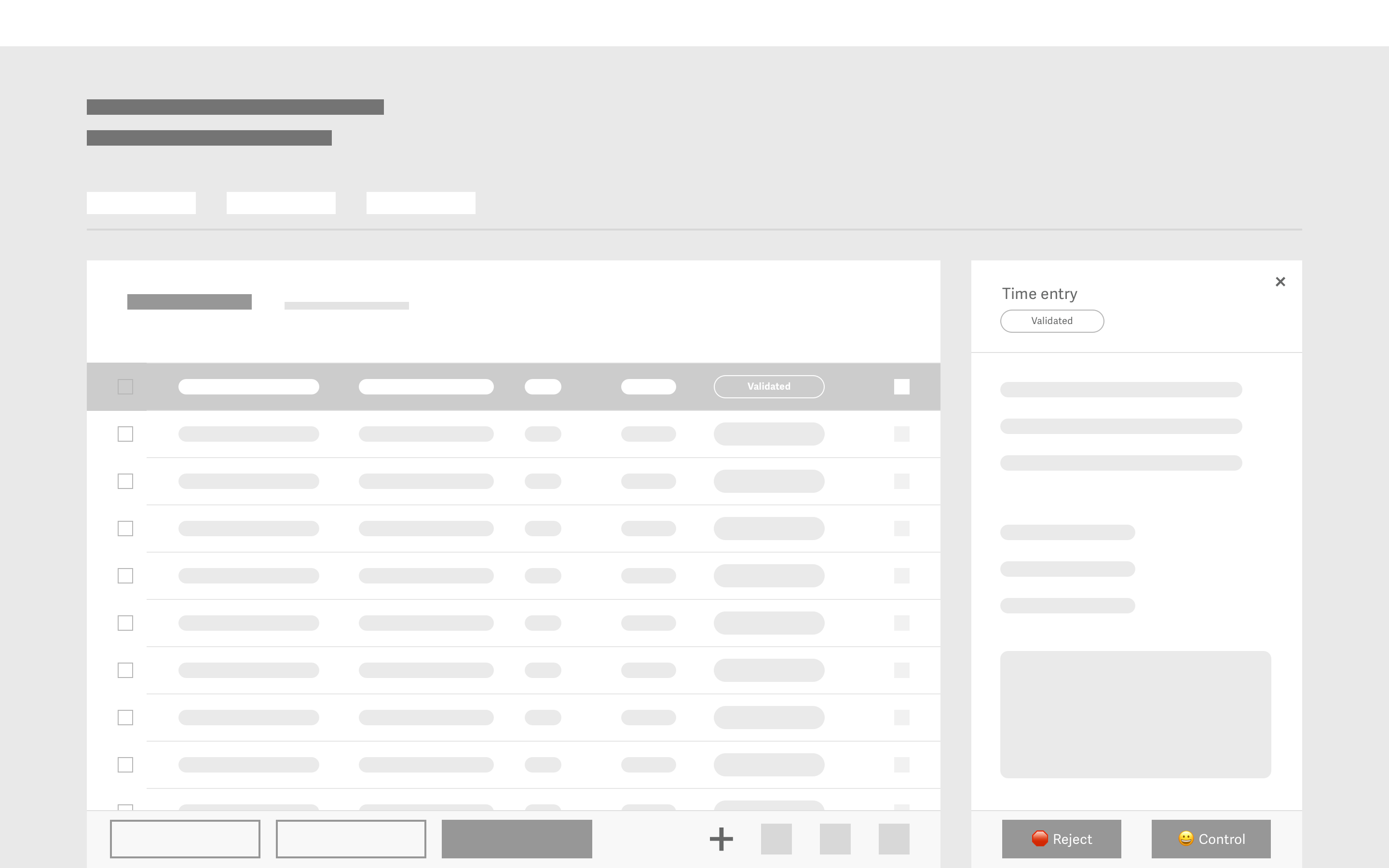
I created separate clickable wireframes for each role (Employee, Controller, Manager) to ensure the flows made sense from each user's perspective.
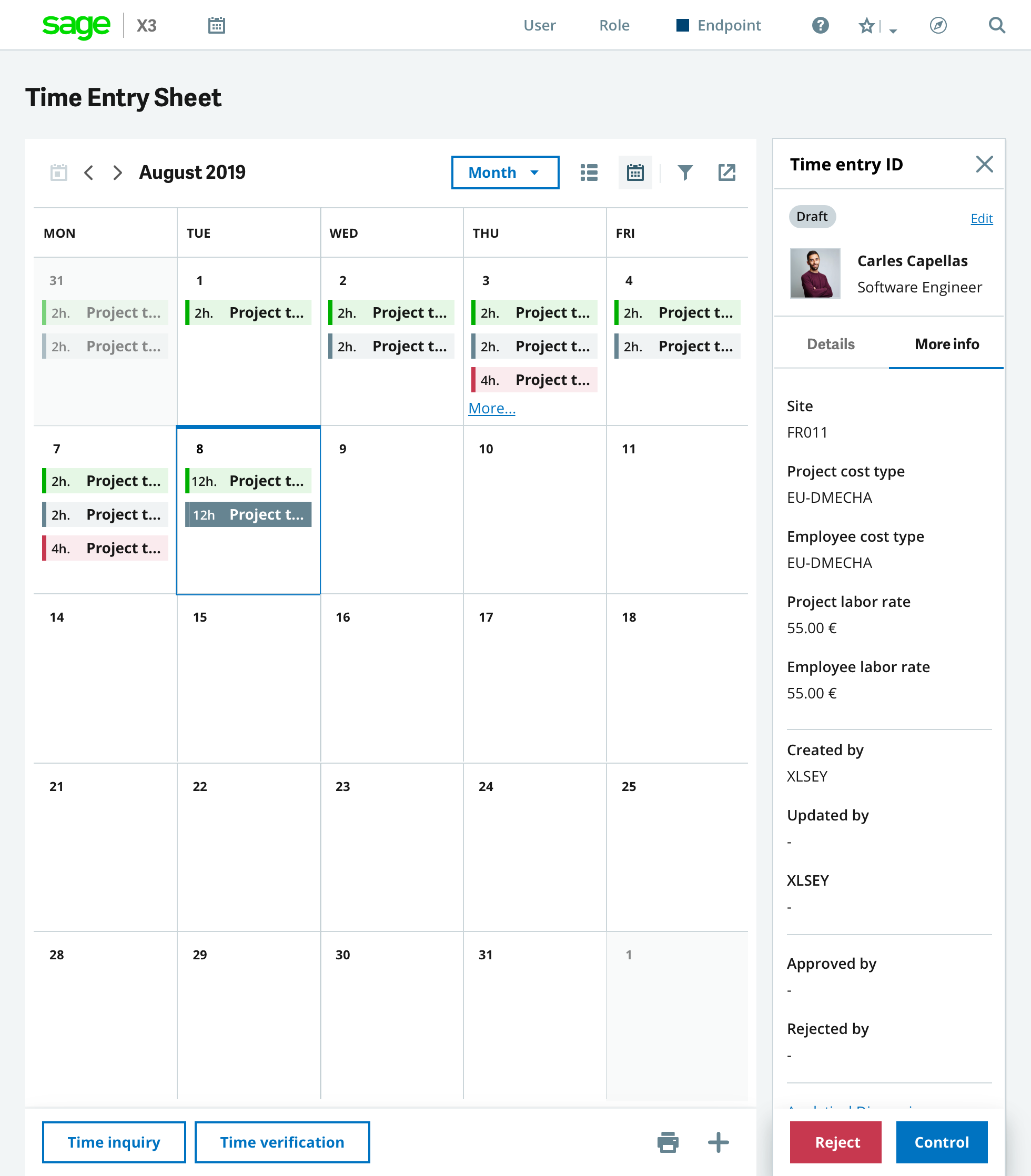
Users needed flexibility: some prefer data density (table view), others prefer temporal context (calendar view). I designed both, with seamless switching.
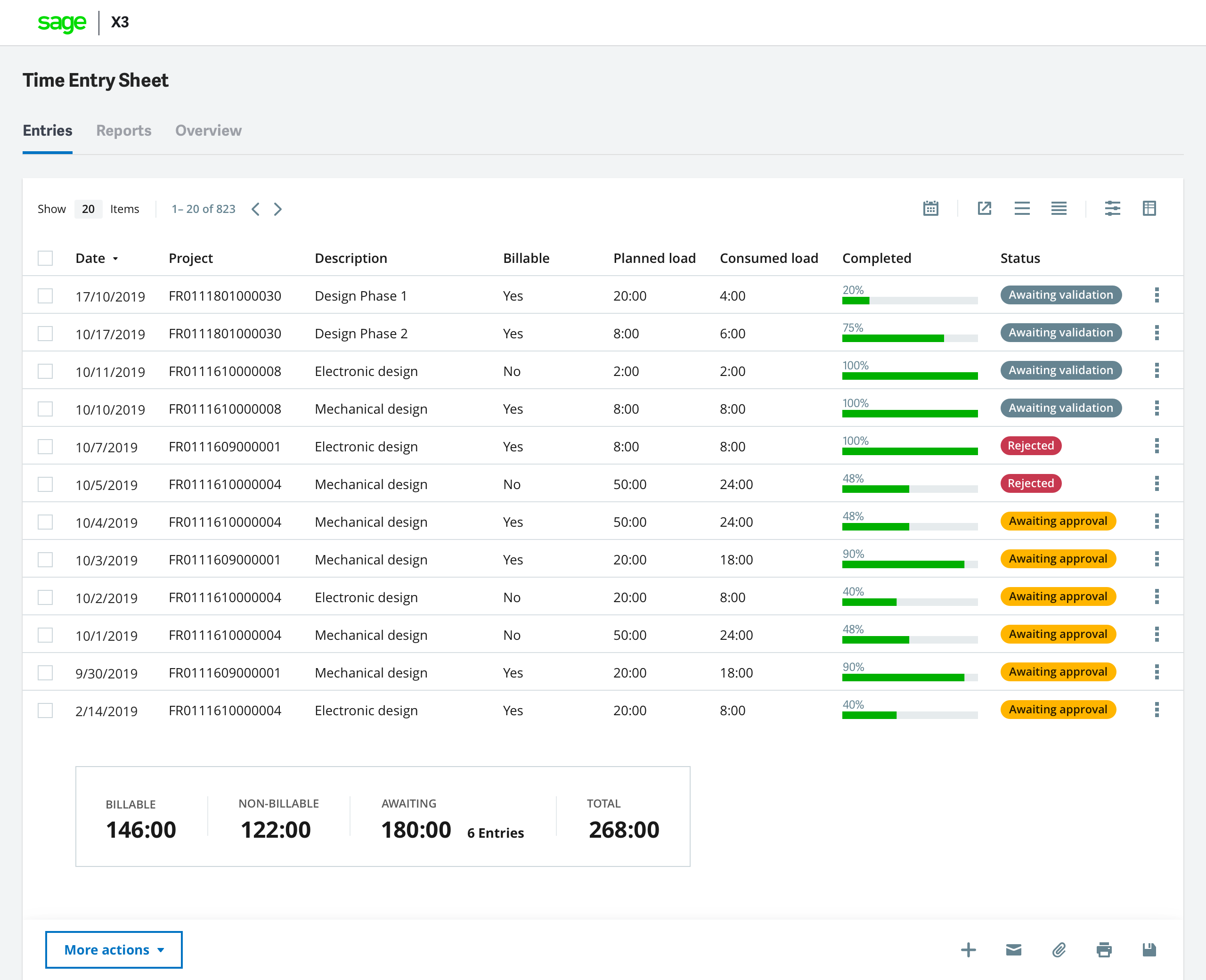
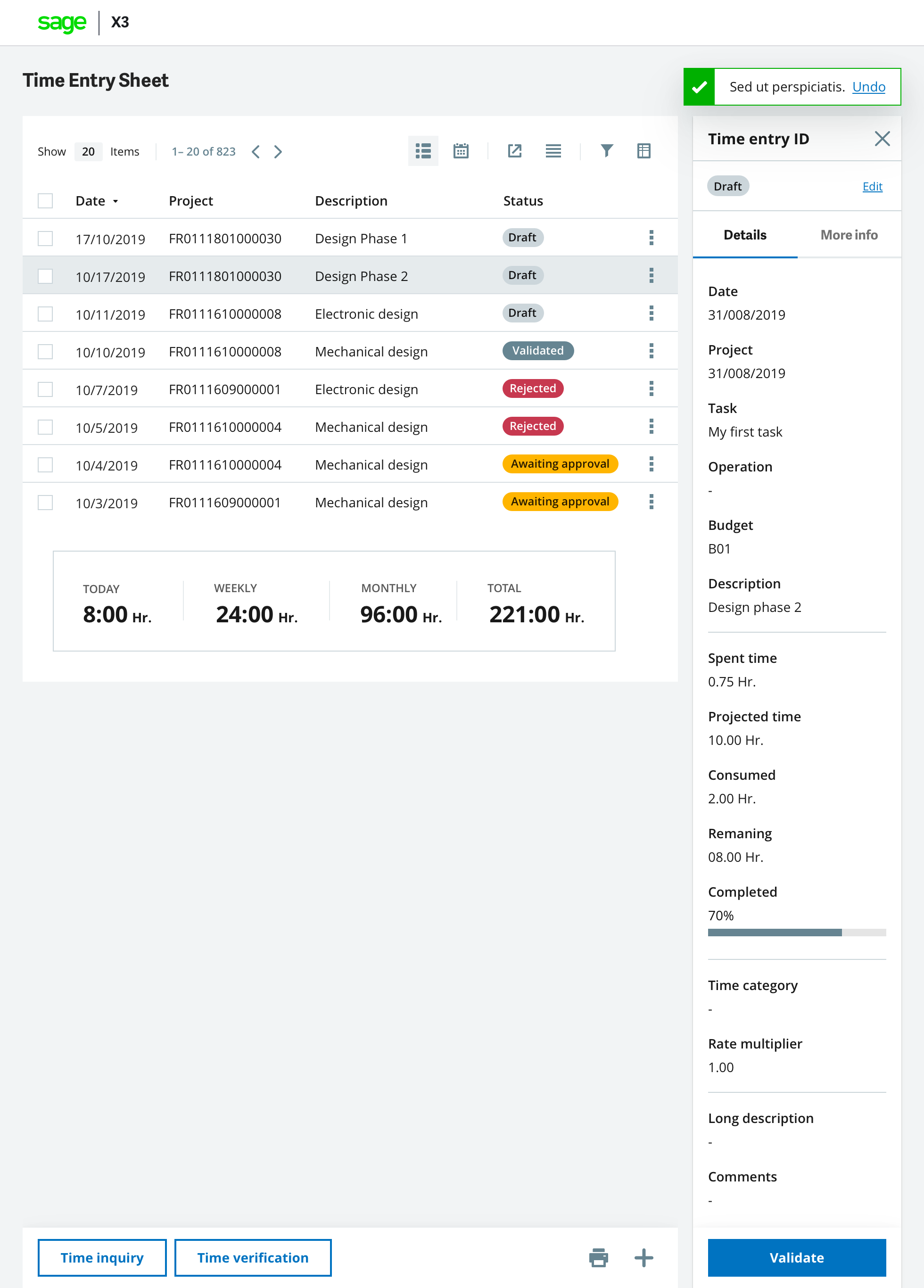
1. Grid View — Data-Dense Time Management
The grid view provides a sortable, filterable table with all time entries. Key features include:
- Summary footer — Total hours (today, week, month, all time)
- Status pills — Visual state indicators at a glance
- Row actions — Edit, View, Duplicate, Validate, Delete
- Column customization — Users choose which data to display
2. Calendar View — Temporal Context
The calendar view visualizes time entries across day, week, or month views. Color-coded entries by project make workload distribution immediately visible.
The feature required designing several reusable components, some of which I proposed as additions to the Sage Design Language System:
Details Panel
Clicking any row opens a slide-in panel showing the full record. The panel includes status, actions, and linked data (Analytical Dimensions, Currency Rates).
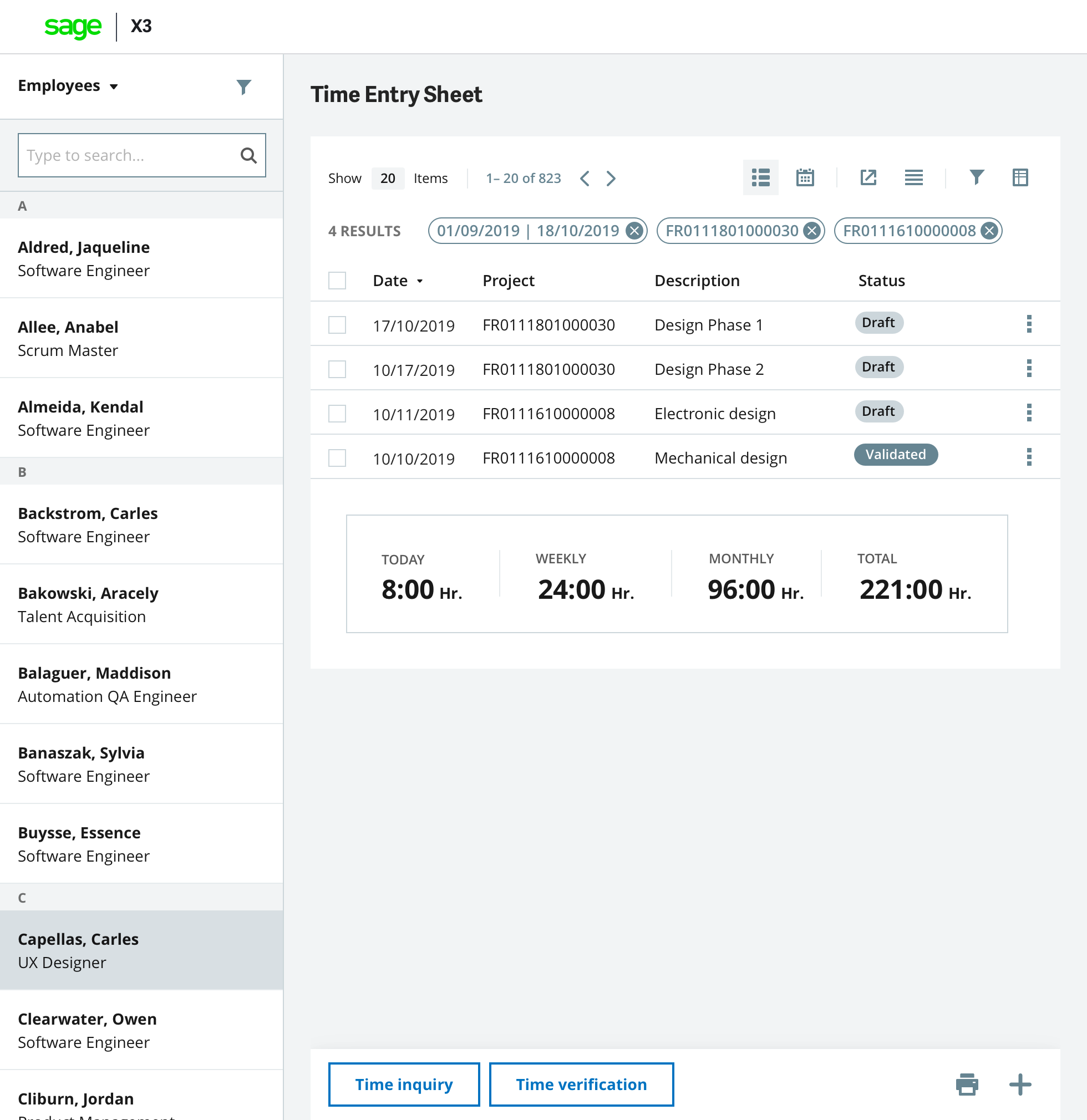
Left Navigation (Manager View)
Managers need to navigate across employees, projects, or tasks. The collapsible left navigation allows filtering the main grid by any grouping.
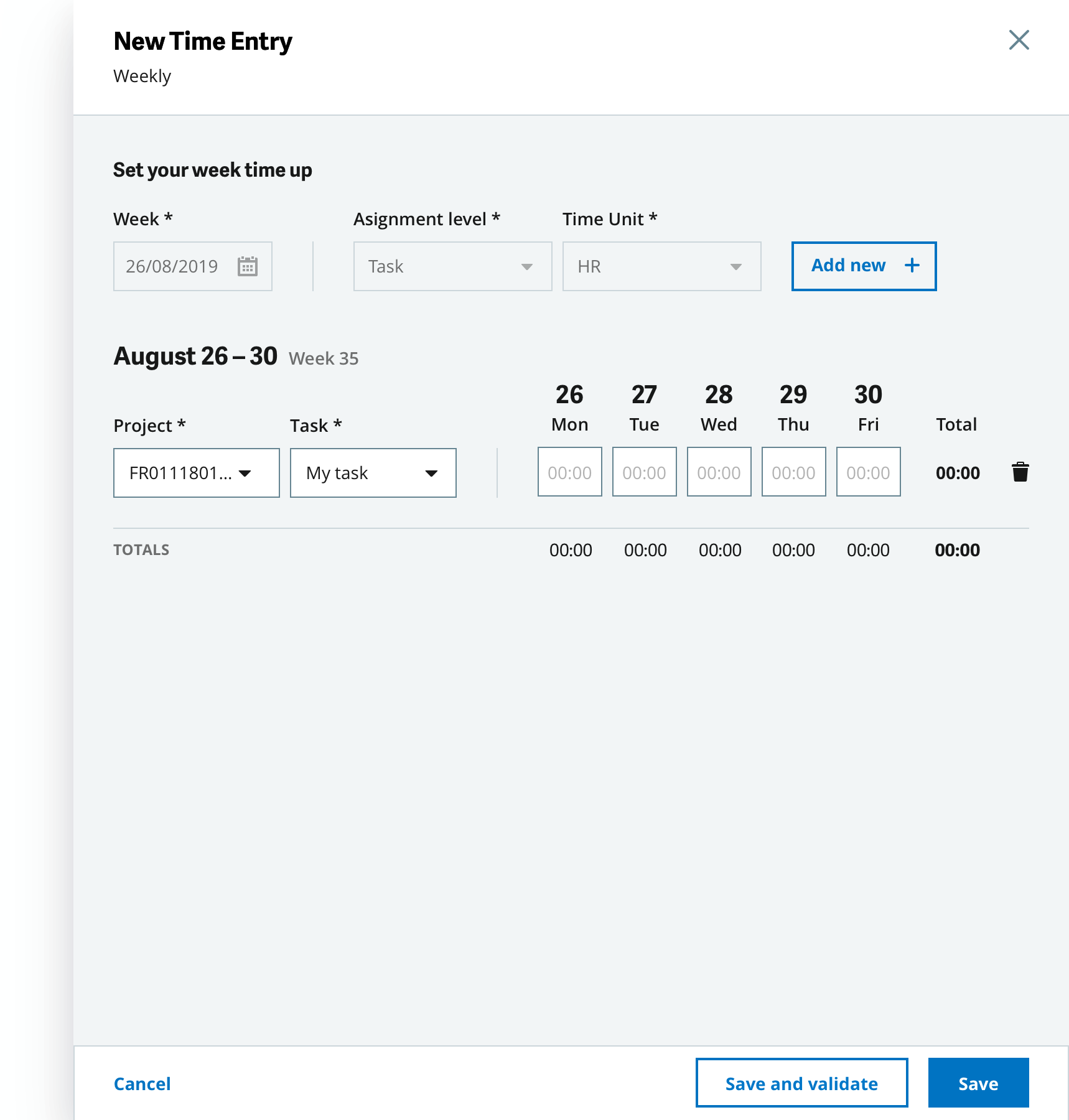
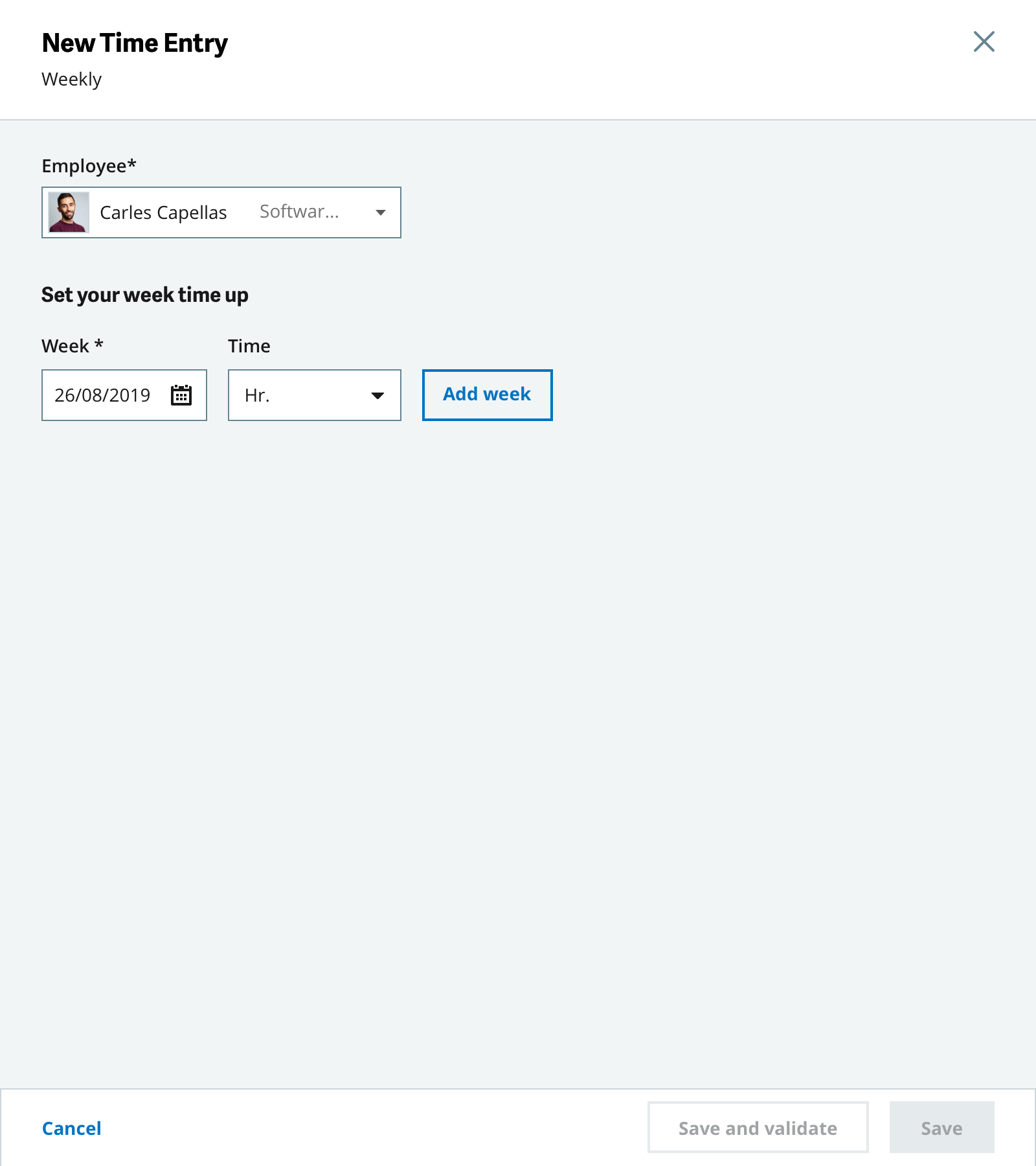
Sidebar: Create & Edit
A 560px sidebar for creating/editing individual entries, or 800px for weekly bulk creation. Smart defaults and validation reduce errors.
Employee Selector Dropdown (New Component)
I proposed a new dropdown variant with avatars for managers creating entries on behalf of employees. This was submitted as a DLS enhancement.
Time Entry needed to work across 5 breakpoints (XL, L, M, S, XS). I established responsive patterns that later became standards for other ETNA features:
- XL/L (1920px, 1440px) — Full layout with sidebar and grid
- M (980px) — Condensed layout, collapsible panels
- S/XS (600px, 320px) — Stacked navigation, infinite scroll, full-screen sidebars
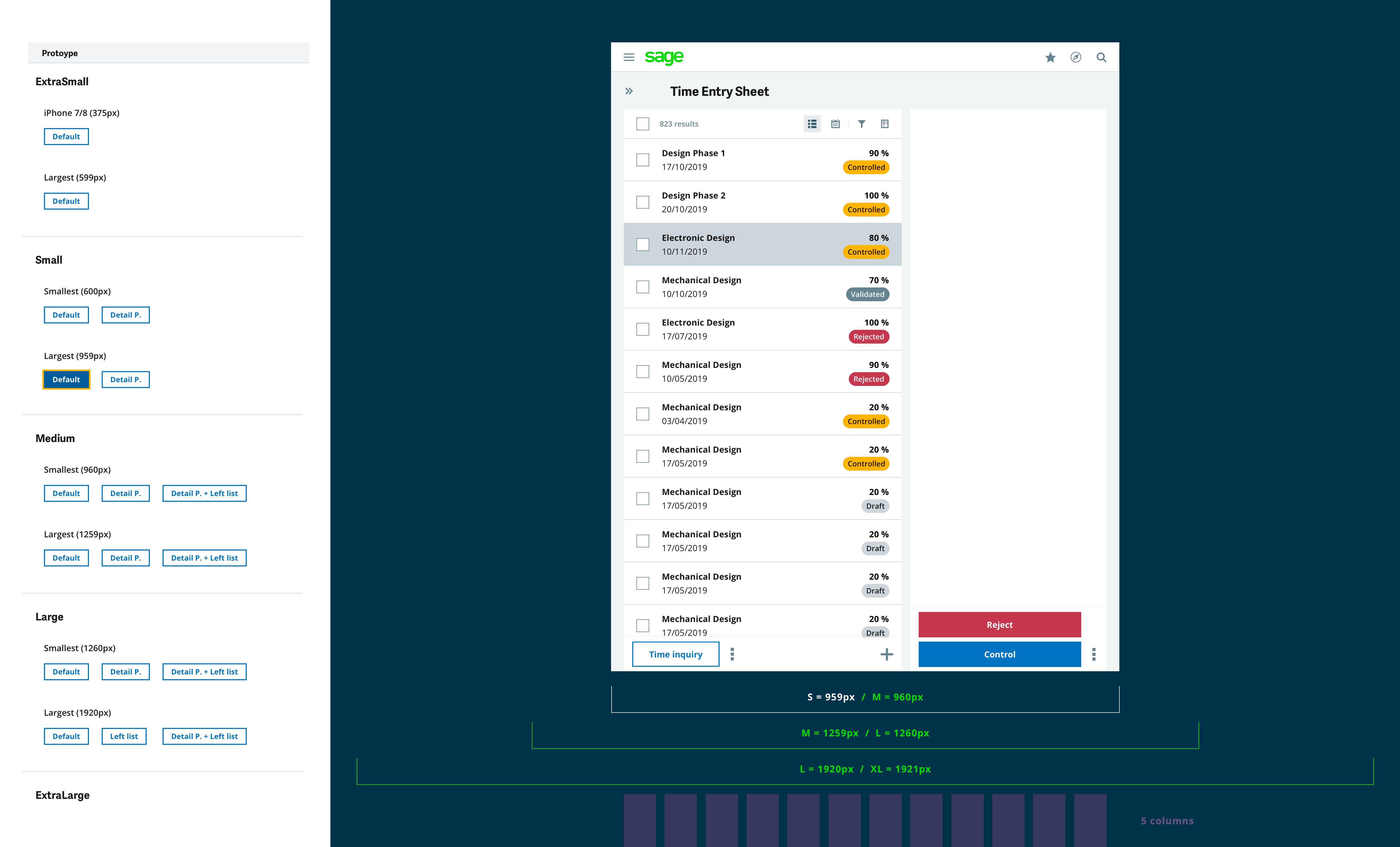
Key mobile adaptations included:
- Left navigation becomes a full-screen modal
- Grid summary hides; pagination becomes infinite scroll
- Sidebar takes full screen width
- Calendar defaults to day view on small screens
While the core Time Entry design focused on office-based employees, I also explored how these patterns could extend to field service workers — engineers, technicians, and mobile professionals who spend their days at client sites rather than behind desks.
This concept prototype, created for stakeholder alignment, demonstrates a proactive, location-aware time tracking experience that minimizes manual input:
🗺️ Geofencing Triggers
System automatically creates transportation time entries when the user arrives at or leaves a client site.
⏱️ One-Tap Timer
Minimal friction task tracking — start/stop with a single tap while viewing next scheduled tasks.
📍 Map + Calendar
Spatial and temporal context combined — see where and when work happens in a unified view.
Design Insight: Field workers lose up to 25% of billable time to untracked travel and transitions. By shifting from "manual logging" to "automatic capture with human confirmation," we can recover this hidden value while reducing administrative burden.
This early thinking (2019) laid the groundwork for what would eventually become Sage Intelligent Time in 2022, expanding from location-aware automation to full AI-powered activity recognition.
This project resulted in a comprehensive design package for engineering handoff:
- 28-page UX Specification Document — Detailed component specs, interaction patterns, and responsive rules
- 28+ Marvel Prototypes — Clickable prototypes for all user flows across all breakpoints
- Sketch Source Files — Organized in Abstract for version control and collaboration
- Design System Contributions — New components and patterns proposed for DLS
- Wireframes save weeks of rework. By validating flows with stakeholders before high-fidelity design, we caught role permission issues early. This prevented costly development pivots.
- Design for the most constrained user first. Starting with the Employee role (most limited permissions) helped establish a baseline. Manager and Controller views then layered on additional capabilities.
- Responsive isn't just scaling — it's rethinking. Mobile time entry required fundamentally different interaction patterns, not just smaller components. The left navigation becoming a modal was a key insight.
- Specifications are a design deliverable. The 28-page spec document became the single source of truth for engineering. Investing in documentation reduced back-and-forth during implementation.
The Time Entry patterns I designed became the foundation for a significant product evolution. In 2022, Sage integrated with Sage Intacct to launch Sage Intelligent Time — an AI-powered virtual Time Assistant that transforms how professionals track billable hours.
By automatically generating time suggestions from emails, calendar events, and desktop activity, Time Entry shifts from a passive administrative task to an intelligent workflow extension. More complete and timely Time Entry data means increased billable capture, shorter billing cycles, and real-time visibility into project profitability and resource utilization.
"Sage Intelligent Time transforms Time Entry from low-value administrative filling into an automated, intelligent data gateway — providing a more timely and complete decision-making foundation for project profitability, resource planning, and cash flow management."
Measured Impact
AI-powered activity recognition recovers previously untracked billable work
Reduced time from work completion to timesheet entry and approval
AI-Powered Features
The Smart Time Engine reconstructs your work week by analyzing signals from your digital ecosystem — turning fragmented data into accurate timesheets:
The Sage Intelligent Time interface showcases the AI-powered workflow:
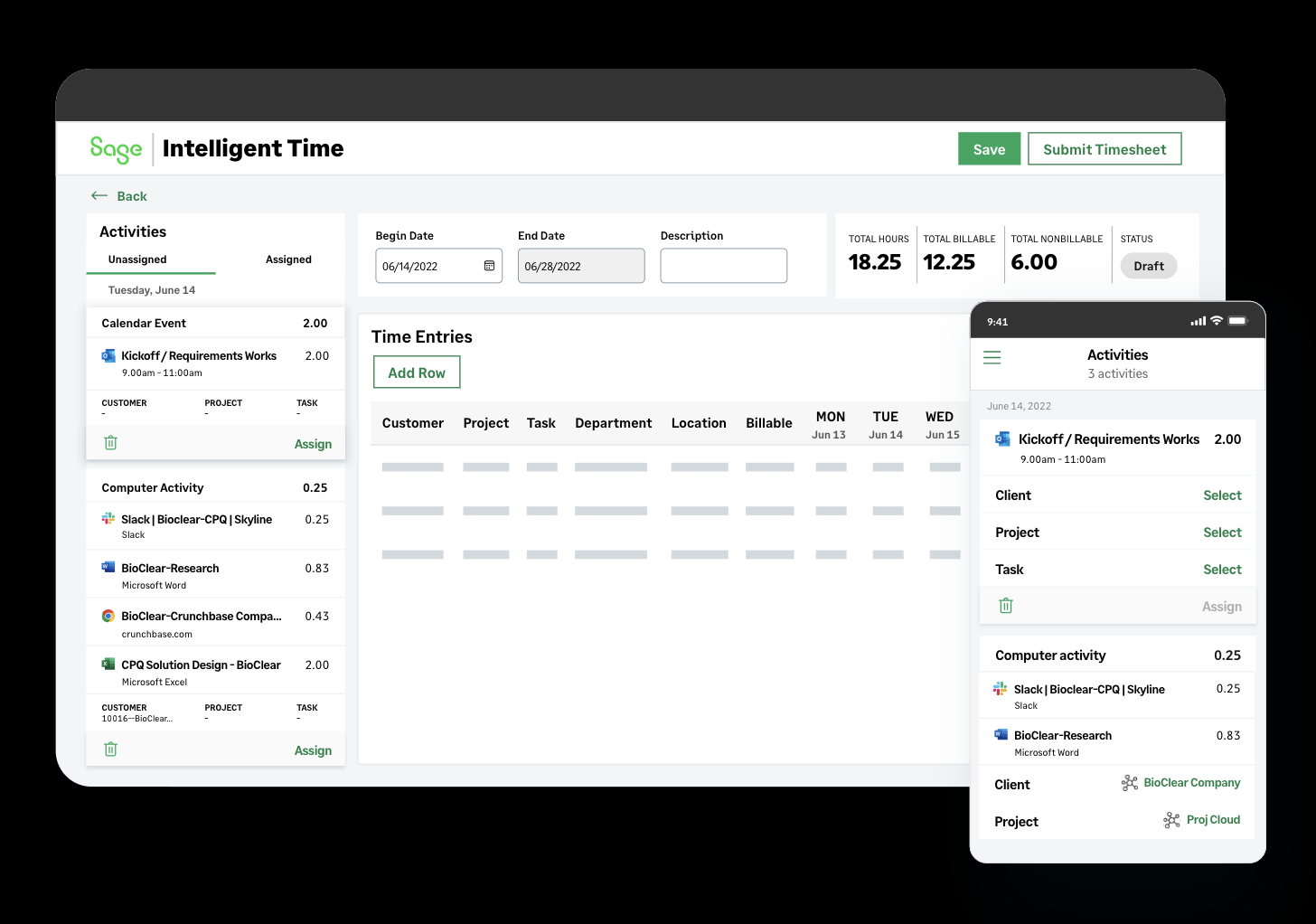
AI-Assisted Workflow
The design shifts time entry from "recall and rebuild" to "review and tweak":
1️⃣ Connect Data Sources
Sync Outlook calendar, email, and computer activity (Word, Excel, Slack). System scans and processes activities in the background.
2️⃣ Activities Sidebar
Left panel displays captured activities with time duration, source icon, and suggested project/task assignments based on ML learning.
3️⃣ Drag & Assign
Drag activities to timesheet rows or click "Assign". Auto-fills time, project, billable status. User confirms before submission.
UX Insight: The sidebar pattern enables human-in-the-loop verification — AI suggests, humans confirm. This builds trust while delivering automation benefits. The same interaction works on mobile, making time entry accessible anywhere.
$10,000
Annual billable time recovered per employee — time typically lost to human error in manual tracking
Designing for Trust
AI-powered time tracking raises important questions about privacy and user autonomy. When designing these features, I prioritized giving users control over their data:
🔐 User Control
AI provides suggestions, never auto-submits. Users always have the final say on what goes into their official timesheet.
👁️ Transparency
Confidence scores visible on every AI suggestion. Users can see why the system made a recommendation (email match, calendar event, etc.).
⚙️ Opt-In Sources
Users choose which data sources to connect. Not comfortable with email scanning? Calendar-only mode works too.
Design Principle: The best AI features feel like a helpful assistant, not a surveillance tool. By making the AI's reasoning visible and keeping humans in the loop, we build trust while delivering automation benefits.
The UX patterns established in my original Time Entry design — the dual-view architecture, status workflows, and responsive patterns — continue to inform how time data is captured, reviewed, and approved across the Sage ecosystem.